If you’re a bookkeeper or part of a small finance team, you probably spend more time than you’d like entering invoice details manually and chasing approvals. It’s repetitive work and it adds up quickly. That’s why many teams start looking for accounts payable software for small businesses once those manual tasks begin to pile up.

86% of small businesses still manually enter invoice data, and processing a single invoice costs around $15 on average. For companies handling dozens of invoices each month, this can quickly drain resources and finances.

To help you choose the right tool, we’ve evaluated the best accounts payable software for small business using 10 clear criteria. We compared pricing, automation features, approval controls and integrations with accounting platforms like QuickBooks and Xero, among other factors.

From our analysis, we selected five tools that work particularly well for small teams. Here's a closer look at each one.

Our top 5 picks at a glance

Before we explore each option in more detail, here’s a quick comparison of the best accounts payable software for small businesses.

ap_tools_comparison

What is accounts payable software?

Accounts payable (AP) software helps businesses manage the process of receiving invoices, approving them, and paying vendors.

Instead of tracking bills in spreadsheets or email threads, the software automates the steps between receiving an invoice and sending payment. Accounts payable automation software essentially replaces manual data entry, paper invoices, and approval emails with a structured digital workflow that allows you to:

  • Capture invoice data automatically
  • Send invoices to the right people for approval
  • Schedule or process vendor payments
  • Store documents and approval history for audit purposes

Good to know: Manual invoice processing costs around $10.18 per invoice on average – but accounts payable automation can significantly reduce this.

7 signs your small business needs accounts payable software

Many small businesses only adopt AP software after a problem arises. But in reality, there are usually red flags long before this point.

Here are a few practical warning signs to look out for:

  • You’re chasing approvals through email or Slack. Invoices often sit in inboxes waiting for someone to approve them, slowing payments and creating confusion.

  • Invoices get buried in email threads. Without a central system, bills arrive from multiple suppliers and quickly become difficult to track.

  • You’ve accidentally paid a duplicate invoice. Manual entry and email approvals make it easier for duplicate payments to slip through unnoticed.

  • You’re missing early payment discounts. Slow approval workflows are a common issue and this sometimes becomes a big challenge for AP teams.

  • Your bookkeeper spends hours entering invoice data. Manual entry still dominates small business accounting, with 48% of small businesses relying on paper invoices.

  • You have no clear audit trail. If someone asks who approved a payment, the answer may involve searching through emails and spreadsheets.

  • Multiple people need to approve payments. Growing businesses often require managers, finance staff, or owners to review invoices before they’re paid.

If any of these sound familiar, you may benefit from accounts payable software for small businesses. A structured system also creates a proper audit trail, which can strengthen your financial overview.

The 5 best accounts payable software tools for small businesses

Now that you know the signs to watch for, let’s look at the tools that can actually solve those problems.

1

ApprovalMax

Best for approval workflows and internal controls

ApprovalMax is cloud-based
AP automation software designed for finance teams using Xero and QuickBooks Online. It focuses on the part of accounts payable that creates the most friction: approvals, financial controls, and invoice oversight. Instead of relying on email chains or spreadsheet tracking, ApprovalMax routes invoices through structured approval workflows before they reach your accounting system.

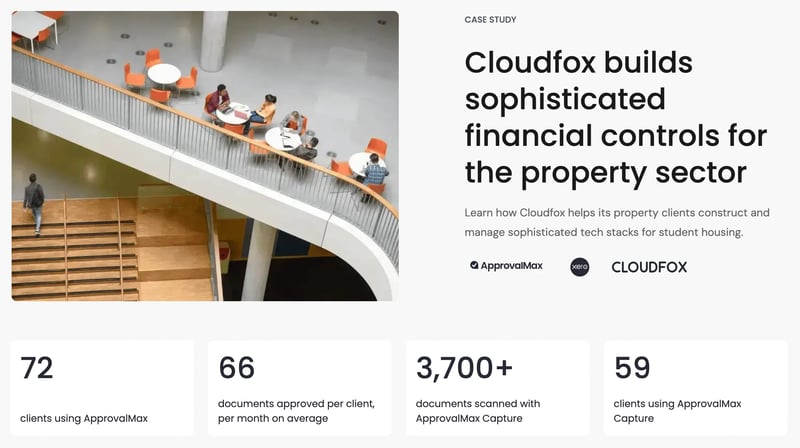
More than 19,000 businesses use ApprovalMax today, and 25% of bills are approved within two hours. Cloudfox, a UK property consultancy, now runs 72 clients through ApprovalMax, averaging 66 approved documents per client each month with over 3,700 documents scanned through ApprovalMax Capture. Next Dimension Accounting, an Australian firm offering outsourced AP services, doubled its business in two years after building its service model around ApprovalMax, saving clients an average of 1.2 days per month on approvals alone.
Standout features:

  • ApprovalMax Capture extracts invoice data using OCR before it reaches your accounting system. Teams can upload invoices in bulk or route them through a dedicated supplier email inbox.
  • Multi-step approval workflows route invoices based on amount, department, vendor, or category. Multiple approvers can participate without needing additional accounting software licenses.
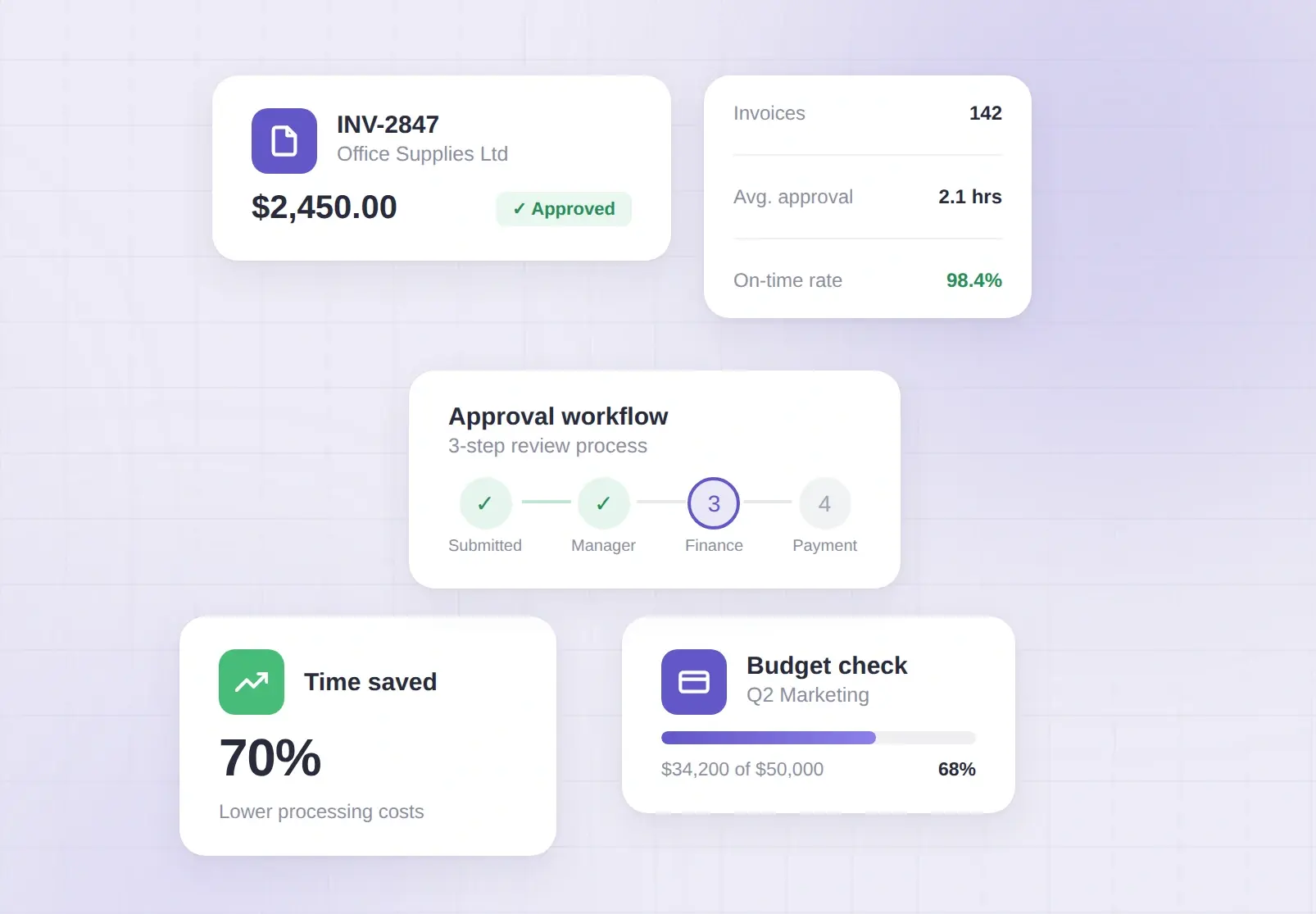
  • Budget checking compares invoices against budgets imported from QuickBooks or Xero, so finance teams can catch overspending during approval.
  • Batch payment approvals let finance teams approve entire payment runs in a single step.
  • Editing on approval lets approvers correct small mistakes without restarting the entire workflow.
  • Audit trail and fraud detection records a full approval history, flags duplicate invoices, and highlights bank detail changes.

Cons:

  • Pricing can feel higher than the accounting software it extends, though many users report ROI justifies it.
  • It integrates well with Xero and QuickBooks – businesses on other ERPs should check compatibility.

Integrations: Integrates with Xero, QuickBooks Online, Airwallex, and Dext Prepare.

Pricing: Structured in transparent tiers starting at $49.50 (Standard, Advanced, and Premium) and varies slightly depending on the accounting platform used.

User reviews: ApprovalMax is consistently praised for its ease of setup and the financial controls it gives teams without requiring access to the accounting system itself. As this reviewer explains:

On the improvement side, some users would like more transparency around how feature requests are tracked and prioritized. Here's one example:

2

Ramp

Best for AP automation and spend management

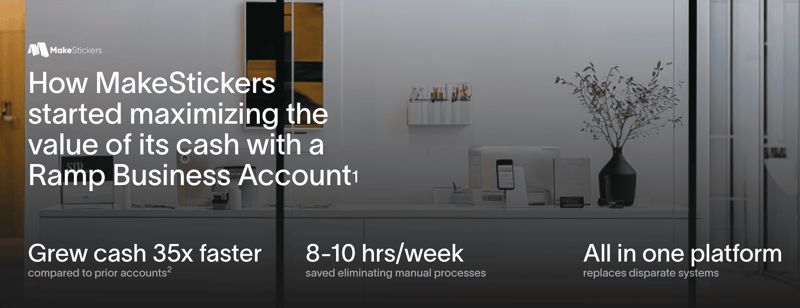
Ramp is an all-in-one finance platform that combines accounts payable automation with corporate cards, expense management, and vendor management. It is designed for businesses that want to manage company spending and invoice payments in a single system. That consolidation drives real efficiency gains: The Second City saved around $40,000 per year and cut bill processing time in half, while MakeStickers reduced AP work by 8-10 hours per week after consolidating multiple banking partners onto Ramp.

Standout features:

  • Ramp uses AI-powered OCR to extract invoice data automatically, with 99% accuracy and line-item capture. It also assigns GL codes automatically to reduce manual data entry.
  • Overbilling detection flags invoices that appear higher than historical spending patterns, giving finance teams a chance to review unusual charges before payment.
  • Ramp combines corporate cards and accounts payable in one platform, letting businesses manage invoices and employee spending in the same workflow.
  • Custom approval workflows route invoices and expenses to the correct approvers based on roles and permissions.

Cons:

  • AP functionality sits alongside Ramp’s corporate card platform, so some users find it less specialized than dedicated AP tools.
  • Advanced approval workflows require the paid Ramp Plus tier.
  • Businesses may need to adopt Ramp’s corporate card to unlock the platform’s full value.

Integrations: Integrates with Xero, QuickBooks Online, Airwallex, and Dext Prepare.

Pricing: Structured in transparent tiers starting at $49.50 (Standard, Advanced, and Premium) and varies slightly depending on the accounting platform used.

User reviews: Ramp consistently gets high marks for its clean interface and how easy it makes day-to-day expense management. Reviewers frequently highlight the receipt capture and the way the dashboard surfaces items that need attention. As this reviewer explains:

On the downside, some small business users find that Ramp's dynamic credit limits can be unpredictable, and the payment structure differs from a traditional credit card. Here's one example:

3

Plooto

Best for straightforward AP/AR with flat-rate pricing

Plooto is an accounts payable and accounts receivable platform designed for businesses that want simple payment automation with predictable pricing. It helps finance teams manage invoices, approvals, and vendor payments while keeping accounting records in sync. That efficiency shows up in real results: Minutes Solutions, a company managing over 150 contractors, cut payment times by five times after switching to Plooto, consolidating what used to be a week-long payroll process into a single day. Accounting firm Enkel saw similar gains, saving more than 100 hours per month by automating AP workflows across its client base.


Standout features:

  • Two-way syncing with QuickBooks Online and Xero automatically reconciles payments and maintains a full audit trail.
  • Customizable approval workflows let businesses create authorization tiers for invoice approvals.
  • Document capture with OCR extracts invoice data automatically to reduce manual entry.
  • Plooto connects businesses to a network of more than 120,000 vendors, supporting both domestic and international payments.

Cons:

  • No dedicated mobile app is currently available.
  • Customer support can sometimes be slow and phone support is not offered.
  • International transaction fees can be higher depending on payment type.

Integrations: QuickBooks Online, Xero, and NetSuite (Pro plan).

Pricing: Plans start with Go ($9/month), followed by Grow ($32/month) and Pro ($99/month) with flat-rate transaction fees.

User review: Plooto scores well for ease of setup and ongoing reliability. Reviewers consistently highlight the QuickBooks integration and how quickly teams can get up and running. As this reviewer explains:

On the downside, some users flag slow payment processing times and recent fee increases. Here's a recent example:

4

Melio

Best free option for simple bill payments

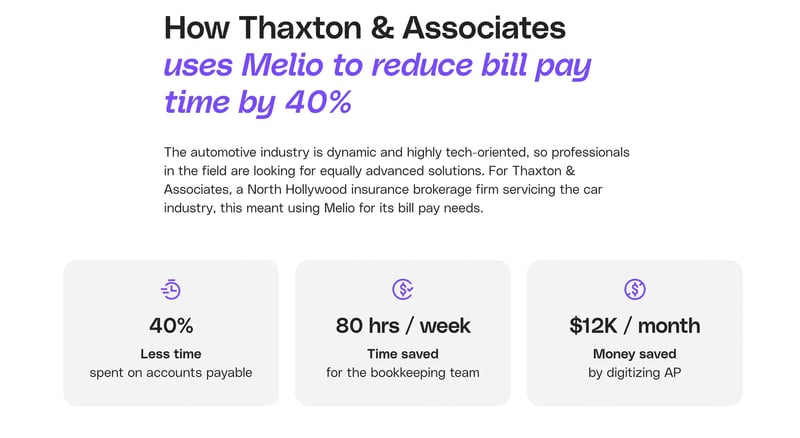
Melio is an online bill payment platform designed for small businesses that want a simple way to manage vendor payments and invoices. It focuses on making payments easier while helping businesses manage cash flow. That simplicity pays off in practice: Thaxton & Associates, an insurance brokerage servicing over 400 dealerships, cut AP processing time by 40% and saves around $12,000 per month, while Accounting Solutions cut AP processing time by 60%.
melio-case-study-screenshot


Standout features:

  • Melio lets you pay vendors by credit card even when they don't accept cards. It charges a 2.9% fee, but this can extend cash flow by up to 45 days depending on your credit card billing cycle.
  • The Go plan includes five free ACH payments per month.
  • Two-way syncing with QuickBooks Online and Xero keeps payment records aligned with your accounting software.
  • Batch and scheduled payments make it easier to manage recurring bills and supplier payments.

Cons:

  • Limited advanced reporting means Melio works best as a payment tool rather than a full accounting system.
  • Customer support is primarily available through chat or email on lower-tier plans.
  • Approval workflows are fairly basic compared with dedicated accounts payable automation tools.

Integrations: QuickBooks Online, QuickBooks Desktop, and Xero.

Pricing: Plans start with the free Go plan, with paid plans including Core ($25/month), Boost ($55/month), and Unlimited ($80/month). Credit card payments incur a 2.9% processing fee.

User reviews: Melio is widely praised for its simplicity and QuickBooks integration. Reviewers frequently highlight the flexibility of paying vendors by credit card and the responsive support team. As this reviewer explains:

On the downside, some users report issues with failed payments and difficulty getting resolution from support. Here's a recent example:

5

BILL

Best all-in-one AP/AR platform for growing teams

BILL is a cloud-based financial operations platform that automates both accounts payable and accounts receivable. It's widely used by growing finance teams and known for its large vendor payment network. That scale translates into real results: ThinkLeader reduced accounts payable processing time by 85%, while Consultance Accounting saved 65% on costs and cut processing time by 90%.
Standout features:

  • BILL combines AP and AR automation in one system, helping businesses manage the full bill-to-pay and invoice-to-cash process.
  • Bill Intelligence AI automatically extracts invoice data, fills in key fields, and flags potential duplicate invoices.
  • BILL's vendor payment network is one of the largest in the space, reducing the need to manually collect supplier bank details.
  • The platform supports multiple payment methods, including ACH, check, wire transfer, card, and international payments.

Cons:

  • Per-user pricing can become expensive for larger teams.
  • Some G2 reviewers note that customer support response times can be slow, with most support handled via chat and email.
  • Some users find the interface slightly cluttered.

Integrations: QuickBooks Online, Xero, NetSuite, Sage Intacct, and Microsoft Dynamics.

Pricing: Plans start at $45/user/month (Essentials) and go up to $89/user/month (Corporate), with an Enterprise tier available on request. All pricing is published on their website.

User review: BILL scores well for ease of use and onboarding. Multiple reviewers highlight the invoice recognition feature and centralized vendor management as key time-savers. As this reviewer explains:

On the downside, some users flag gaps in how BILL syncs document files with their accounting software. Here's a recent example:

How we identified the best accounts payable software for small businesses

Most "best AP software" lists don't define what "small business" actually means. They'll put enterprise tools like Tipalti and SAP alongside simple bill pay apps and call them all "small business solutions." That's not helpful when you're a 15-person company trying to figure out which tool fits your budget and workflow.

We took a different approach. Before evaluating a single tool, we defined our audience, established transparent selection criteria, and applied them consistently. Here's exactly how we did it.

What counts as a "small business" for AP software?

In the United States, the Small Business Administration (SBA) defines a small business as an independently owned, for-profit entity with 500 or fewer employees. However, the SBA's definition was designed for government contracting eligibility, not for choosing accounts payable software. A 400-person company with a full finance department and an enterprise ERP has very different AP needs than a 20-person company where the owner is still approving bills from their inbox.

For this guide, we defined "small business" using practical thresholds that reflect who actually searches for AP software:

  • Fewer than 100 employees
  • Under $10 million in annual revenue

This captures three distinct groups we see looking for AP solutions:
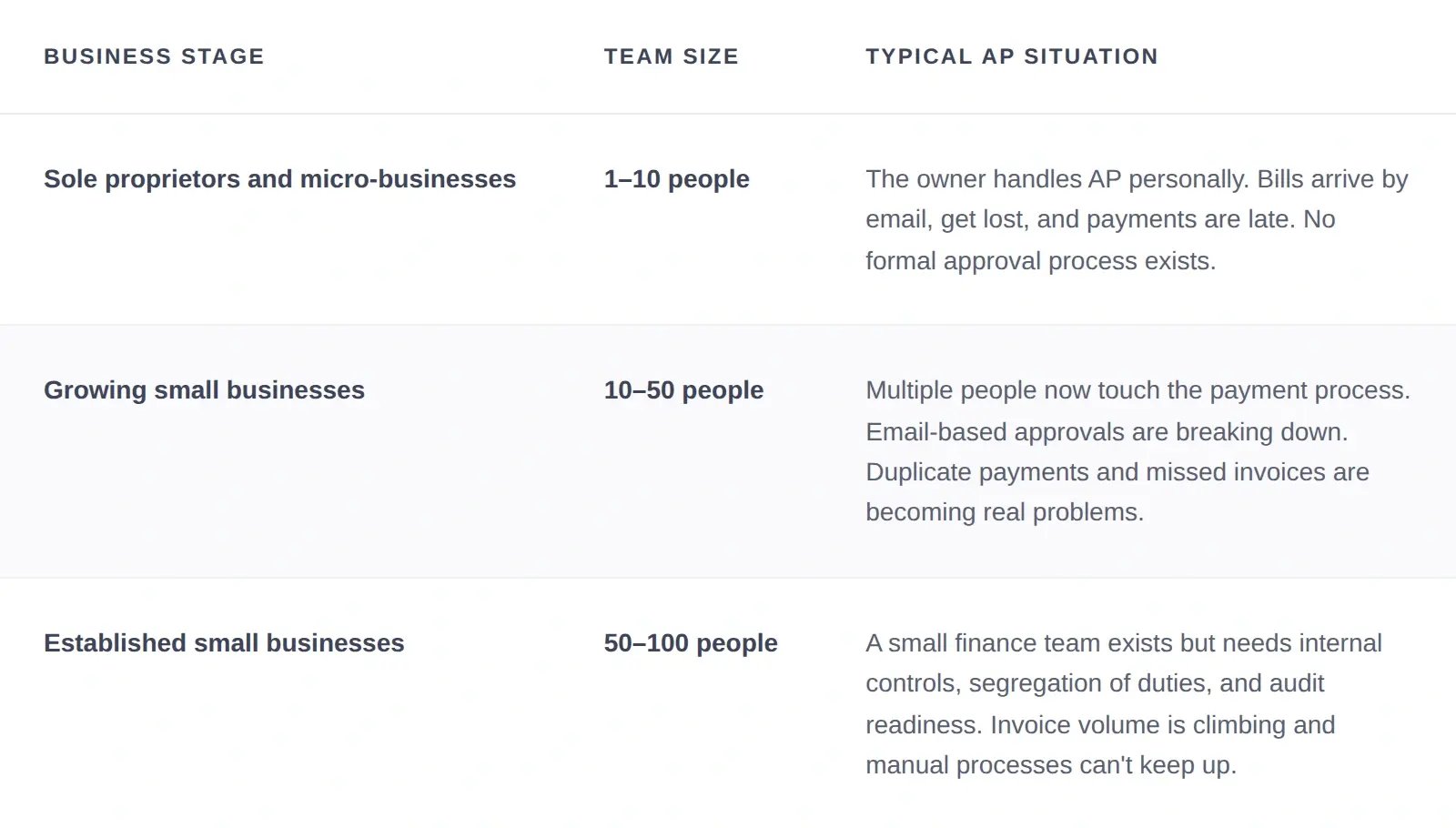
business_stage_table

The average cost of processing a single invoice manually is $15 and takes 14.6 days to complete. For these businesses, the right AP software isn't about having the most features. It's about eliminating manual work and preventing costly errors without requiring an enterprise budget or a 3-month implementation.

Selection criteria

We evaluated every tool against 10 criteria before including it in this guide. Here's what we looked for:

Core functionalities (Non-negotiable)
The software must handle invoice capture, approval routing, payment processing, and reporting as a core function. A general accounting tool with a "pay bills" button doesn't qualify.
Customer ratings (minimum 4.5/5)
We checked both G2 and Capterra for each tool. Where ratings differ significantly between platforms, we note both. Two tools in our list fall below 4.5 when averaged across both platforms: Melio and BILL. Both are noted transparently.
Transparent pricing
Pricing must be published on the website.
Free trial or freemium
Small businesses need to test software in their own workflow before committing. A "request a demo" button is not a substitute for hands-on experience.
Accounting software integration
The tool must connect natively to QuickBooks Online, Xero, or Sage.
Usability and onboarding speed
A non-technical user should be able to get up and running in days, not months. We factored in G2 ease-of-use scores and whether the platform offers self-serve onboarding.
Scalability and value for money
Clear upgrade paths so you're not locked into a tool you'll outgrow in 12 months, or stuck paying enterprise prices when you only need the basics.
Usability and onboarding speed
A non-technical user should be able to get up and running in days, not months. We factored in G2 ease-of-use scores and whether the platform offers self-serve onboarding.
Small business case studies
We looked for verified results from businesses that match our definition, not enterprise success stories repackaged with "small business" in the headline.
Demonstrated ROI
The tool should show measurable results: reduced processing time, lower per-invoice costs, or captured early-payment discounts. We cross-referenced vendor claims with published case studies.
Security and compliance
We looked for SOC 2 or ISO 27001 certifications, role-based access controls, audit trails, and fraud detection features. Even small businesses need protection against duplicate payments and vendor fraud.

How to choose the right AP software for your small business

Choosing the right AP software starts with understanding how your business currently handles invoices and approvals. The best tool should simplify your workflow and reduce manual work, not add more steps.

Before selecting a platform, ask yourself the following questions:
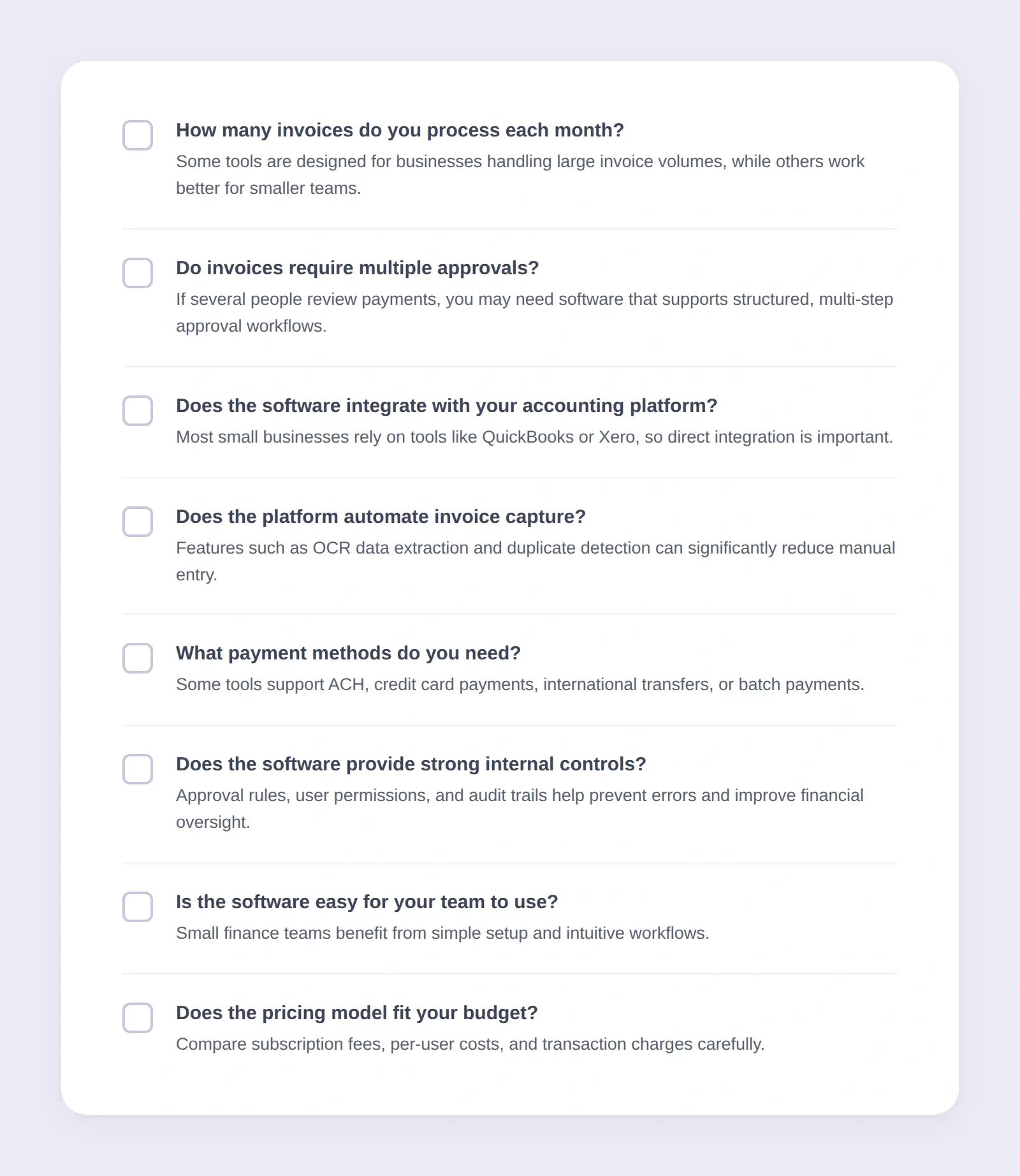
ap-automation-for-small-business-checklist

Conclusion

Choosing the best accounts payable software for your small business depends on how your team works day to day. Invoice volume, approval complexity, and your accounting setup all influence which tool will fit best.

In this guide, we compared several platforms using transparent criteria designed for businesses with fewer than 100 employees. Rather than focusing on sales pitches, we looked at practical factors like automation features, integrations, pricing, and ease of use.

Some tools prioritize simple bill payments, while others focus on broader spend management or financial operations. If your priority is stronger approval workflows and clearer financial controls, ApprovalMax stands out as a strong option.

The key is choosing software that supports your workflow today while still leaving room for your business to grow.

Getting started with ApprovalMax

Getting started with ApprovalMax is straightforward. You can begin with a 14-day free trial and no credit card is required. This gives you time to connect the platform to your accounting system and see how automated approvals work in practice. Our pricing is transparent, so you know exactly what to expect before committing.

Most teams set up the system in just a few steps:

  1. Sign up and connect your Xero or QuickBooks account
  2. Set approval workflows based on roles, departments, or spending limits
  3. Invite approvers and define permissions
  4. Start routing invoices through AP automation workflows

Once everything is connected, invoices can move through approvals automatically, giving your team better oversight without any extra admin.

FAQs

How can AP software help take advantage of early payment discounts?

Many vendors offer 1-2% discounts if invoices are paid within 10 days. AP software speeds up processing and approval so you can capture these discounts consistently.

How does AP software prevent invoice fraud?

Through features like duplicate invoice detection, purchase order matching, and alerts when supplier bank details change. Role-based permissions and approval workflows also ensure no single person can approve payments without oversight.

At what point should a small business switch from manual AP to software?

Once you process 20 or more invoices per month or involve multiple people in approvals. If your team spends hours entering data, chasing approvals, or fixing errors, it's time to automate.

Do I need AP software if I only pay 10-20 bills a month?

It depends on your process. If invoices get lost in email, duplicate payments happen, or there's no clear approval record, AP software can still help even at low volumes.

What's the difference between AP software and accounting software?

Accounting software like QuickBooks or Xero manages financial records, reporting, and taxes. AP software focuses specifically on the bill-to-pay workflow: capturing invoices, routing approvals, and scheduling payments.

How long does it take to set up AP software?

Most small business AP tools take a day or less. More complex setups with multi-entity structures or custom approval workflows may take a few days.

What kind of ROI can a small business expect from AP software?

According to Ardent Partners, automated AP environments reduce processing costs by more than 70% compared with manual processes. Most small businesses also save 10-20 hours per month on invoice handling.

kasia-icon

Kasia Bargielowski-Foster specializes in bridging the gap between complex product capabilities and real-world impact. Translating what a product does into why it matters, ensuring that every update is rooted in delivering genuine value to the customer.

Register to attend