You're building an end-of-month payment run from a long stack of incoming invoices. The IT equipment you ordered came in at the price you were quoted. The facilities bill matches the agreement, line for line.

All decisions were made when the purchase order was approved. But you still have to open each bill, find the right PO, check the numbers, and approve it by hand. Forty bills in, they're all sitting in the same queue waiting for the same manual check, so nothing makes the two that don't match their PO stand out. This is exactly where things slip, despite all the hours you put in week after week.

The hidden cost of checking every bill manually

Start with your time. You're spending it confirming things which have been approved, and most of the effort goes on bills that match their PO. You're not deciding anything. You're confirming what has already been agreed to, one bill at a time.

Then there's the bigger risk. A bill that doesn't match its PO is often the first sign of an overcharge, or an invoice that should never be paid. However, when nothing in the process holds those bills back, they can get approved just like the bills that genuinely match, and the cost only shows up after the money has left. With 79% of organisations reporting attempted or actual payment fraud in 2024 (AFP 2025 Payments Fraud and Control Survey), unmatched bills deserve more scrutiny, not the same fast sign-off as the ones that match.

A system that matches, routes, and flags bills on its own

To avoid these problems, what should an ideal process look like? Picture the same incoming invoices, but now, all bills are matched automatically. After that, any bills that match its PO from a supplier you trust are auto-approved the moment it arrives. What's left is the handful that don’t match; each can be routed to the right approver and flagged with the reason it needs checking.

Matching becomes an automated job, and the matching status decides how each bill should be handled in the most efficient way. No chasing, no signing off bills on autopilot, and nothing risky hiding behind something routine.

All of this can be done with ApprovalMax's latest updates to the Bill-to-PO matching feature, which checks every bill against its PO automatically and routes it based on matching results.

1

Bill-to-PO auto-matching via ApprovalMax Capture

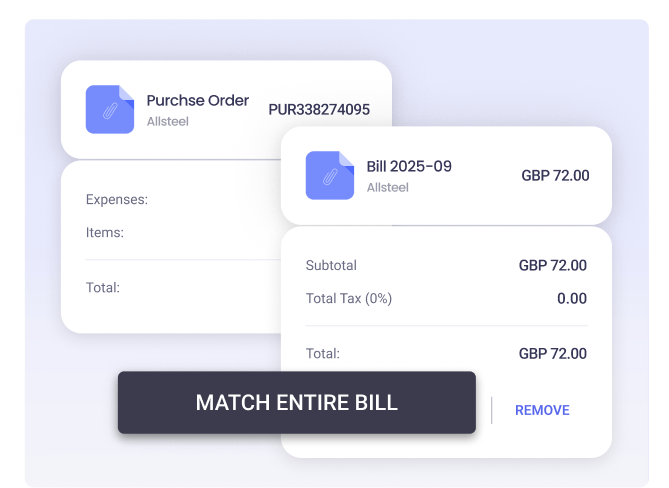
The match now happens before you touch the bill. When an invoice arrives, ApprovalMax Capture finds the PO number on it, finds the right purchase order, and links the two for you. The bill reaches your workflow already matched, so there's no hunting for the PO before approval can start. This capability is available with Xero, QuickBooks Online and NetSuite.

2

Auto-approval for fully matched bills

When a bill aligns with its PO and comes from a supplier you trust, it can be approved automatically, with no one needing to step in. You can limit this to the suppliers, categories, or departments you choose. That's the biggest, most repetitive part of your week off your plate. This capability is available with QuickBooks Online and NetSuite.

3

Flag mismatched bills before payment

The bills that don't match get more attention, not less. Partial and unmatched bills are flagged to the right approver, or up to a senior one. You can also add Price Checker to compare each line item against what you agreed, so an item billed above its agreed rate gets caught, even when the bill total still looks right. This capability is available with QuickBooks Online and NetSuite.

Components (1)

With Bill-to-PO matching, you get your time back for the work that needs judgment, and the confidence that nothing leaves the business without being checked first. Less chasing. More control over the bills that carry real risk.

approvalmax blog avatar

Written by

ApprovalMax

Product expert

ApprovalMax is a trusted Xero, Quickbooks and NetSuite partner who helps finance teams implement structured approval workflows and financial controls across the entire Money Out lifecycle - not just at the point of payment. 
LinkedIn