Choosing accounting software is one of the biggest decisions a small business can make, especially at early-stage. Two platforms dominate the conversation:

  • QuickBooks Online – with over 8 million subscribers globally;
  • Xero – used by 4.4 million businesses across more than 180 countries.

Both are cloud-based, handle the accounting fundamentals well, and integrate with a wide range of add-ons – including accounts payable automation tools. This article gives you a balanced, practical breakdown of how they compare, so you can pick the one that’s best for your business.

Short answer

QuickBooks Online is the stronger fit for established US small businesses that need deep reporting and built-in payroll. Xero suits growing teams that want unlimited users, a cleaner interface, and reliable bank feeds.

QuickBooks Online vs Xero at a glance

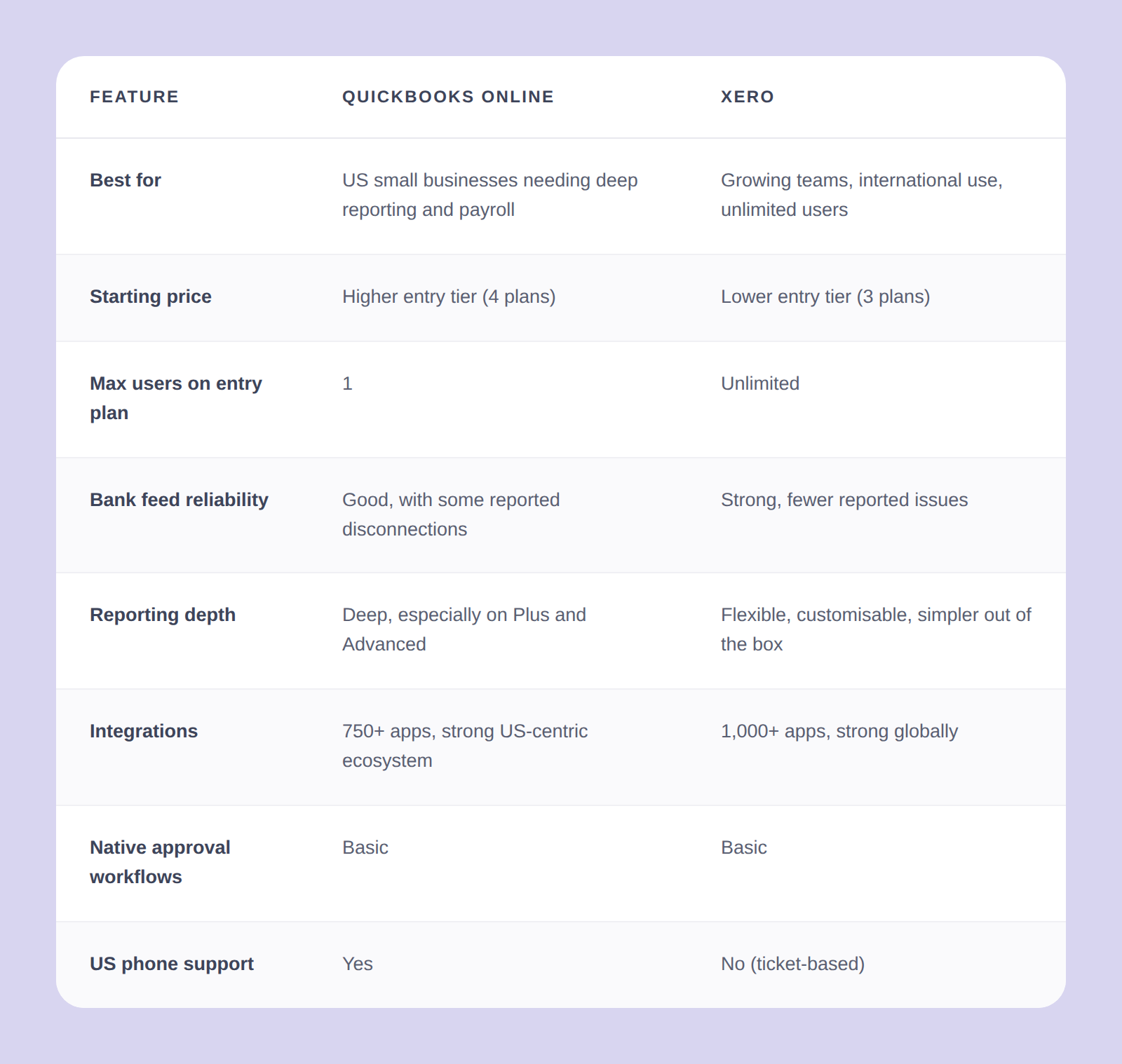
Here is a side-by-side summary before we dive into greater detail.

QuickBooks_Online_vs_Xero_table


Pricing compared

Xero is typically cheaper at entry level and includes unlimited users on every plan, which changes the cost significantly for growing teams. QuickBooks Online offers four tiers (Simple Start, Essentials, Plus, and Advanced), with features like class tracking and advanced reporting locked behind the higher tiers. This means many businesses end up on a more expensive plan than they initially expected.

QuickBooks Online has historically run steeper promotional discounts on new signups, so the initial price can look closer than the ongoing cost. QuickBooks has also raised prices more aggressively over recent years, which is a reason many users cite when they start evaluating alternatives. However, Intuit typically accompanies price increases with feature additions.

For up-to-date pricing, check QuickBooks Online's pricing page and Xero's pricing page directly.

Ease of use and interface

Both platforms are cloud-based with modern web interfaces, and neither feels dated in 2026. Xero is generally considered cleaner and faster to navigate, particularly for people new to accounting software. Its dashboard surfaces key categories at the top with quick dropdowns, which makes the learning curve gentler.

QuickBooks Online packs more functionality into its sidebar, which is a genuine strength for experienced users but can mean more clicks to find things. QuickBooks Online also recently refreshed its interface, which has reduced some of the clutter, though long-time users report a period of reorientation as familiar features moved around.

Both have capable mobile apps and support multiple devices without version-control issues. For AP automation best practices, the interface you spend time in every day matters more than any single feature difference.

User access and collaboration

This is where Xero has a clear structural advantage. Every Xero plan includes unlimited users at no extra cost, whether that is one person or fifteen. QuickBooks Online caps users by tier:

  • Simple Start allows one user
  • Essentials allows three
  • Plus allows five
  • Advanced allows up to 25.

For growing teams, that difference compounds quickly and can push you into a more expensive tier faster than expected.

Both platforms support role-based permissions, so you can give an external accountant read-only access or restrict AP staff to specific functions, which is an important part of maintaining solid accounts payable controls. Both are fully cloud-native, so there are no version-control headaches across devices or locations.

Bank feeds and reconciliation

Both platforms offer direct bank feeds from thousands of US banks, and both support rules-based auto-matching and machine-learning-assisted reconciliation. Where they differ is in user-reported reliability.

QuickBooks Online has a longer history of intermittent bank-feed disconnections and occasional duplicate transaction imports, a pain point that surfaces often in bookkeeper forums. Xero users report fewer disconnection issues in recent years, though no cloud accounting platform is entirely immune. The bigger your transaction volume, the more bank-feed reliability starts to matter to your team's day-to-day workload.

Reporting and insights

QuickBooks Online has deeper built-in reporting, particularly in its Plus and Advanced tiers. Class and location tracking, budget versus actual reports, and advanced custom reporting are genuine strengths for businesses that need granular financial visibility. Tracking accounts payable KPIs across departments is easier when your reporting structure can mirror your organization.

Xero's native reporting is simpler but highly customizable. You can group and save report templates in flexible ways, and Xero recently partnered with Syft Analytics to add cash flow forecasting and richer visualizations on top of standard reports. Tracking categories are included on every Xero plan, whereas QuickBooks Online's class and location tracking requires Plus or higher, which is worth factoring into your tier decision.

Integrations and add-ons

Both platforms have ecosystems of well over 1,000 apps. QuickBooks Online has a slight edge on integrations with US-centric tools, including specific payroll providers, payment processors, and ecommerce platforms, which reflects its position as the US market leader. Xero's app marketplace is strong globally and particularly deep in invoicing, project management, and bookkeeping workflows.

Common integrations on both platforms include Stripe, PayPal, Square, Shopify, Gusto, HubSpot, Salesforce, and approval workflow tools like ApprovalMax. More on that below.

Customer support

QuickBooks Online offers phone and chat support during US business hours, which suits teams that prefer to talk through problems in real time. Xero operates a ticket-first model: you submit a request and Xero responds, often within hours, with a callback available for more complex issues.

Neither model is objectively better. Users who value picking up the phone tend to prefer QuickBooks Online's approach. Users who prefer a written record and do not mind waiting a few hours generally find Xero's support responsive and thorough. The right answer depends on how your team prefers to work through problems.

Which one is right for your business?

This is what you came here to figure out. Here is a straightforward framework based on business shape, not feature grids.

Pick QuickBooks Online if:

  • You are a US-based small business that needs built-in payroll at a higher tier
  • Deep reporting, class tracking, or location tracking are priorities
  • You prefer phone support as your first line of help
  • Your team is small enough that the per-tier user caps are not a constraint

Pick Xero if:

  • Your team is growing and you do not want to pay more per user as headcount rises
  • You want the cleanest modern interface and a gentler onboarding experience
  • You operate internationally or deal with multiple currencies
  • Reliable bank feeds are a top priority based on your transaction volume

Pick either if: you are a solopreneur or sole proprietor. Both platforms work well at the entry level, and you are unlikely to hit meaningful limits in either direction.

If you are switching: Both platforms have migration tools, but the effort is real. Plan at least a week, ideally at a quarter boundary, and involve your accountant before you start.

One thing neither does well: If structured, multi-step approval workflows matter to your business, neither QuickBooks Online nor Xero has enterprise-grade native approval routing. Both have basic approval features that hit limits quickly as approval chains get more complex.

That is where a third-party layer becomes important, and it connects to the best accounts payable automation software conversation.

How ApprovalMax works with both QuickBooks Online and Xero

Both QuickBooks Online and Xero include basic approval features that work for simple setups. The moment approval chains become multi-step, involve multiple departments, or need to enforce spend policies, both platforms reach their limits quickly.

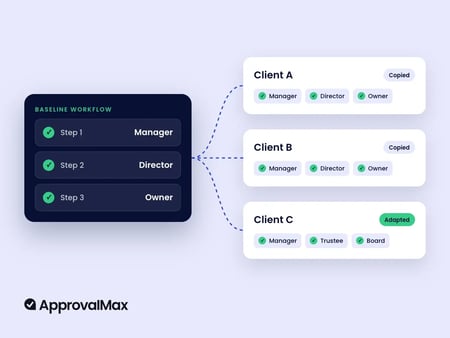
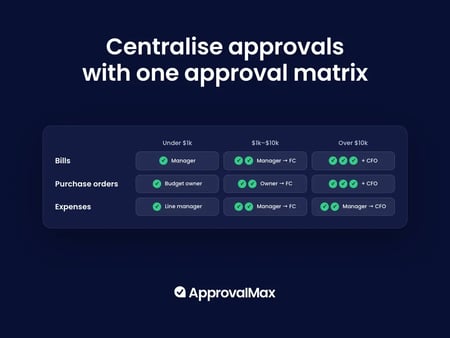
ApprovalMax integrates directly with both QuickBooks Online and Xero, adding a structured approval layer on top of whichever platform you use. It handles three things that neither accounting platform does natively.

  1. Multi-step role-based approval workflows: invoices, bills, and purchase orders route to the right approvers automatically based on amount, department, or vendor, without approvers needing direct access to your accounting system.

  2. Budget checking at the point of approval: ApprovalMax checks spend against budgets imported from QuickBooks Online or Xero before anything is posted to the ledger, so overspending gets flagged before it happens rather than after.

  3. Full audit trails: every approval, rejection, and comment is logged automatically. Each document gets a complete approval history attached, which makes audit preparation significantly less painful.

Thousands of businesses use ApprovalMax with their Xero and QuickBooks Online to close the gap between what their accounting software records and what their finance team actually needs to control. Whether you stay on QuickBooks Online or move to Xero, the approval workflow layer works the same way.

FAQs

Can I switch from QuickBooks Online to Xero, or vice versa?

Yes. Both have migration tools that move your chart of accounts, customers, vendors, and historical data. Plan a week, ideally at a quarter or year boundary, and involve your accountant. Most issues come from custom reports and integrations, not the core data move.

Can I run QuickBooks Online and Xero side by side during a transition?

Technically yes, but not for long. Two sources of truth doubles your bookkeeping and risks data drift. Cleaner approach: hard cutover at a quarter or year boundary, with the old platform kept read-only for historical reference.

Can ApprovalMax replace the need to switch platforms?

Often, yes. Many teams switch because they have hit the limits of native approval workflows, not core accounting. ApprovalMax adds the structured approval layer on top of either platform, solving the workflow problem without the migration cost. If approval control is the real reason, fix that first.

Register to attend