
15 best practices for accounts payable automation in 2026
- What is accounts payable automation?
- What you gain (and avoid) by running AP automation properly
- Who this guide is for
- Accounts payable automation best practices
- How to choose the right AP automation for your business
- Common AP automation mistakes and how to avoid them
- How to get started with AP automation
- Final thoughts
- FAQs
Accounts payable (AP) teams are feeling the pressure with more invoices coming in, fewer people to handle them and rising expectations around accuracy and control. Many businesses turn to automation to relieve the workload, but without strong accounts payable automation practices in place, the process doesn’t actually improve. Invoices still get stuck, mistakes still happen and teams end up doing the same manual work.
In this guide, we’ll explain what AP automation really is, what you can gain (and avoid) when it’s set up properly, along with accounts payable automation best practices you can start using right away.
• Document and standardise your AP workflow before you automate
• Involve the right stakeholders and assign clear AP ownership
• Clean up vendor data, AP policies, and coding rules
• Digitise invoice capture and move away from paper
• Build approval workflows with clear segregation of duties
• Use AP automation to prevent fraud and errors
• Optimise payment runs and cash flow with AP automation
• Integrate AP automation with your accounting or ERP system
• Track AP automation KPIs and improve continuously
• Support change with communication and training
What is accounts payable automation?
Accounts payable automation uses technology to handle invoice capture, coding, approvals and payments. It replaces manual work and repetitive workflows with structured steps that sync to your accounting or ERP system.
This might include:
- Capturing invoices (email, upload, OCR/AI extraction)
- Routing invoices for approval
- Applying coding rules and matching POs
- Sending approved invoices to accounting and payment runs
What you gain (and avoid) by running AP automation properly
AP automation can either offer real control or it can create another layer of admin. The difference comes down to how you set it up.
Who this guide is for
This guide is designed for:
- Accountants and bookkeepers who handle invoices every day
- CFOs and finance managers who focus on control, cash and risk
- Business owners in small and mid-sized companies
- Accounting firms supporting multiple clients’ AP processes
If you’re already using AP automation but feel it should work better, this guide is also for you.
Accounts payable automation best practices
AP automation is easiest to trust when the rules are clear and the process is consistent. These best practices cover the foundations that keep everything working day to day.
Map and standardise your invoice to pay process
You can’t automate a process you don’t understand. Map how invoices really move through your business today. Look for delays, handoffs, repeated tasks and any exceptions like missing POs or disputes.
Typical steps include:
- Invoice received (email, upload, or paper)
- Details checked
- Coding added
- PO or receipt matched
- Routed for approval
- Posted and prepared for payment
Mapping now makes it easier to define rules and workflows later on.
Clean up vendor data, policies, and coding rules before you automate
Most AP issues start with messy vendor data or unclear rules. If the basics aren’t in order, automation only speeds up the chaos. Clean data makes automation smoother and prevents mistakes.
Clean-up tasks include:
- Remove duplicate or inactive vendors
- Validate bank details through a controlled process
- Clarify approval thresholds and roles
- Standardise GL codes used for common spend
Centralise and digitise invoice intake
Bring all invoices into one place instead of scattering them across multiple inboxes. Use a central AP inbox where suppliers can send their documents. This reduces lost invoices and gives you better visibility from the start.
Centralise invoices with:
- A single AP email inbox for all supplier invoices
- A supplier portal where vendors can upload documents directly
- Uploads from shared drives using drag-and-drop or monitored folders
- OCR or AI capture to extract invoice data and reduce manual entry
Enforce PO discipline and smart matching
POs create clarity. They set expectations before work begins, reduce disputes and make approvals much smoother. When POs are used consistently, AP teams spend far less time chasing information.
POs make the most sense for:
- Repeat suppliers where spend happens regularly
- Inventory or stock purchases
- Large or committed spend where you want upfront approval
Once a PO exists, you can match it to the invoice:
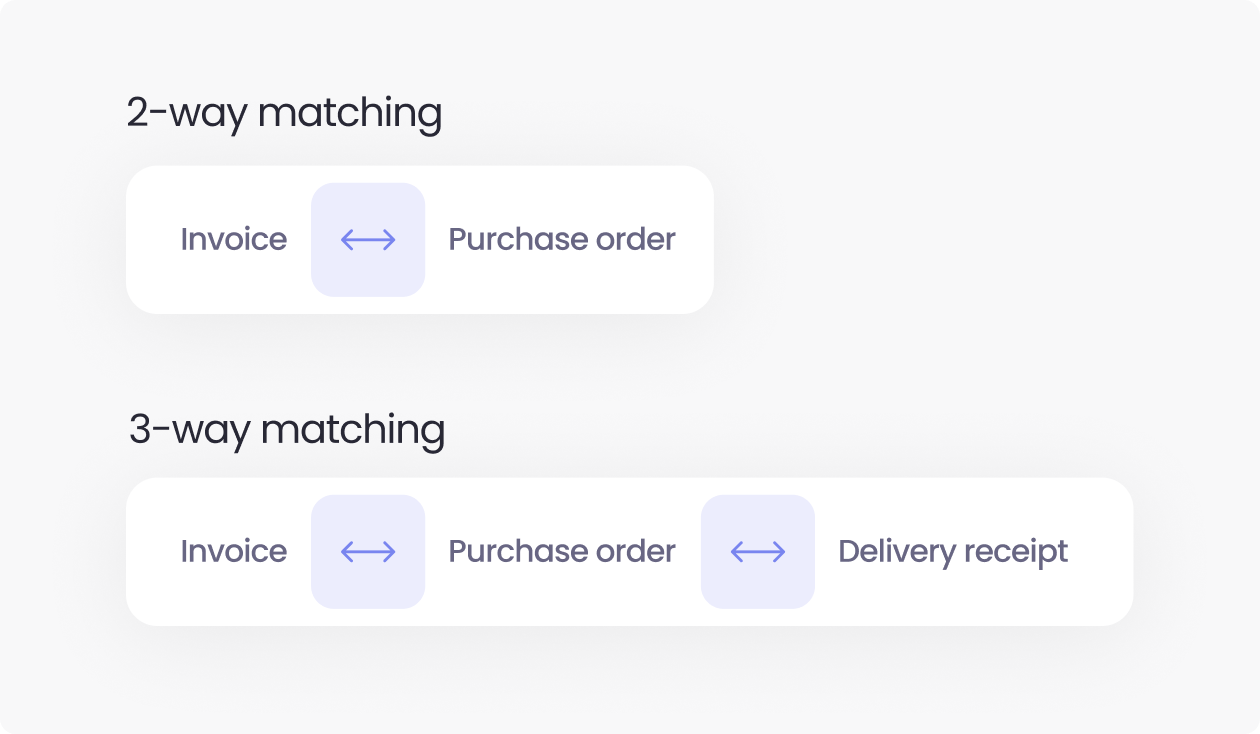
- 2-way matching: invoice ↔ PO
- 3-way matching: invoice ↔ PO ↔ delivery receipt
Design approval workflows around risk and segregation of duties
Approval workflows work best when they reflect risk. A simple safeguard is segregation of duties, where no one person creates, approves or pays the same invoice. This involves building workflows that route invoices based on amount, vendor type or department. Here are some example paths:
- Invoices from new or high-risk vendors: requester → manager → finance
- Invoices without a PO or outside agreed terms: AP → budget owner → finance
- Invoices coded to sensitive cost centres (e.g. marketing, IT, capex): department head → finance
This keeps most invoices moving quickly while adding the right level of oversight for higher-risk invoices.
Use AP automation rules to prevent fraud and errors
AP teams often face risks like duplicate invoices, sudden changes to bank details and invoices from new or unfamiliar vendors. These are easy to miss when relying on manual checks.
Create rules in AP automation to catch these problems early. For example:
- Duplicate checks flag repeated invoices before they reach payment.
- Mandatory reviews trigger when a supplier’s bank details change.
- block invoices without POs in certain spend categories, so higher-risk items always get extra scrutiny.
Rules reduce the pressure on your team and give finance leaders confidence that risks are being monitored.
Keep a clear control framework around AP automation
AP automation becomes part of your control environment, so it shouldn’t feel like a black box.
Keep your control framework simple:
- Document automated controls such as approvals, limits and matching
- Document manual controls like vendor onboarding and policy decisions
- Review both sets of controls yearly with finance leadership or auditors
This keeps the process transparent and easier to monitor.
Design for tax, audit and e-invoicing compliance
AP automation should support tax, audit and e-invoicing requirements in a simple and reliable way. The goal is to keep your records complete and compliant without adding extra work for the team.
This might include:
- Clear approval history with timestamps and user actions
- Structured storage for invoices and supporting documents
- Formats and data fields that meet e-invoicing or real-time reporting rules
This keeps your workflow compliant for different regions and audits.
Secure cross-functional buy-in and name an AP automation owner
Accounts payable automation works best when AP, finance leaders, procurement and IT are involved from the start. Bring these teams into the setup early and name one person as the AP automation owner. This should be someone who watches the rules, handles issues and keeps improvements moving.
AP automation is a great tool but it doesn’t run itself. Someone needs to be responsible for how it works day to day.
Integrate AP automation tightly with your accounting or ERP system
Integration is what turns AP automation from a useful tool into an end-to-end workflow. When it connects properly to your accounting or ERP platform, information moves automatically, double entry disappears and your data stays consistent.
What should sync:
- Suppliers
- Chart of accounts
- Invoices and coding
- Payments and status updates
Questions to ask during setup:
- Is the sync one-way or two-way?
- How often does it run?
- How are errors shown to the team?
Use AI and advanced automation where it truly adds value
AI can genuinely strengthen AP, especially in areas like invoice capture, anomaly detection and smarter matching. Use AI to remove repetitive work, but keep humans involved for exceptions, outliers and higher-risk invoices. This gives you the benefit of automation without losing control or judgement.
Start with a phased rollout and realistic pilot scope
A good pilot includes:
- A contained group (one entity or department)
- A focused supplier list to reduce noise
- Clear metrics like cycle time or exception rate
- Time for feedback before scaling
Optimise payment runs for cash flow and supplier relationships
AP automation offers visibility into what’s due, when it’s due and which suppliers matter most. Use this information to plan payment runs in a way that supports cash flow and protects key relationships.
You can time payments to use early-payment discounts, avoid late fees and prioritise suppliers when needed.
For example: a weekly payment run, with exceptions for suppliers that are vital to operations.
When you can see upcoming obligations clearly, you make better decisions for both cash and supplier trust.
Track the right AP automation KPIs
It’s important to set KPIs to understand whether automation is working. Focus on KPIs that show speed, quality and workload, not just volume.
Useful KPIs include:
- Average invoice processing time – how fast invoices move
- Cost per invoice – overall efficiency
- Percentage paid on time – supplier reliability
- Touchless processing rate – level of automation
- Exception rate – data and process quality
- Invoices per AP FTE – workload capacity
These metrics give you a rounded view of performance without overcomplicating reporting. Learn more about accounts payable KPIs.
Treat AP automation as a continuous improvement programme
Finally, AP automation isn’t something to set up once and forget. Rules, workflows and KPIs should be reviewed regularly to keep pace with business changes. A quick monthly check for issues and a deeper quarterly review helps catch problems early. Over time, you can expand automation to more entities, more suppliers, and more spend categories – strengthening your AP process step by step.
How to choose the right AP automation for your business
Common AP automation mistakes and how to avoid them
AP automation problems are rarely dramatic. They’re usually small misses that compound quietly until approvals slow down, exceptions pile up, and trust in the system starts to fade. Here are the most common ones to watch for, along with the simplest fixes.
A simple 90 day roadmap to get started with AP automation
Days 0–30: map, clean up, and define KPIs
- Map the full invoice-to-pay process and identify bottlenecks
- Clean vendor data, coding rules and approval policies
- Define baseline KPIs like cycle time and exception rate
- Choose a clear pilot scope (e.g. one entity or department)
Days 31–60: pilot setup and first workflows
- Configure the AP automation tool and connect it to your accounting system
- Build approval workflows based on risk and thresholds
- Train the pilot team so they know what to expect
- Run a small batch of invoices through the workflow to test the setup
Days 61–90: scale, measure, and refine
- Run the full pilot and track KPIs against your baseline
- Fix issues, adjust rules and simplify steps
- Decide which teams or entities to add next
- Plan a wider rollout based on what worked
Final thoughts: building a resilient AP function with automation
Accounts payable automation isn’t just about speed, it’s about better control, cash visibility and lowering risks. When you follow the right best practices, you move from “we have a tool” into a resilient AP function that works effectively, even when invoice volume grows.
ApprovalMax gives you the structure to apply these best practices in real workflows, and get more from your AP process. Start small, measure honestly and keep improving. That’s how AP automation pays off over the long term.
FAQs
Which AP tasks should we automate first?
Automate high-volume, repetitive tasks first: invoice capture, data entry, coding and routing for approval. Once that’s stable, add PO matching and basic checks like duplicates or missing fields.
What KPIs should I track to measure AP automation success?
Track invoice cycle time, exception rate, touchless processing rate, cost per invoice and on-time payment rate. These AP KPIs show whether automation is actually saving time, reducing issues and improving reliability.
How long does it take to see results from AP automation?
You can usually see results within 30–60 days of going live with a focused pilot. The first signs are faster approvals, fewer missing invoices and clearer visibility into what’s waiting to be paid.
How do you map an invoice-to-pay process before automating it?
Map it by listing every step from invoice arrival to payment and archive, including who does each step and where delays appear. Capture the real flow, including inbox forwarding, spreadsheets and exceptions, then use that map as the basis for your rules and workflows.
How can AP automation support segregation of duties in accounts payable?
AP automation supports segregation of duties by enforcing who can create, approve and pay invoices in the system. You set rules by amount, vendor or department, and the workflow engine makes sure no one person controls the whole process.
How can automation optimise the invoice approval workflow?
By moving invoices through the workflow using rules instead of email chains. It captures invoices in one place, applies coding and matching rules, routes tasks to the right people, and keeps a full history, which cuts delays and manual work for AP.
Ready to Simplify Your Approval Process?
Justin Campbell, an experienced accountant with a decade at Xero, blends his deep understanding of finance and technology to simplify processes. He uses his expertise to help businesses work smarter, bringing precision and innovation to every initiative.
Set up a system of checks and balances for your financial operations.
Multi-step, multi-role approval workflows for financial documents.
Auto-generated audit reports for each approved item.
Get alerts for fraudulent activity and protect against it happening.
Leave printing in the past with fully digitised workflows.