Understanding that bills need approving doesn't automatically mean you have a process for it, and that catches out some very well-organised finance teams.
Who is allowed to authorise a $12,000 invoice that turned up with no purchase order, what are they meant to check before they approve it, and who picks it up while they're on annual leave and the supplier has started ringing twice a day?
Those answers are the process. Most of the trouble in accounts payable comes from never having written them down, and it tends not to feel like a problem until somebody has to make one of those calls without them.
The accounts payable approval process is the set of rules that decide who authorises a supplier invoice, on what evidence, and in what order, before it is posted to the ledger and paid. A working process sets authority by spend level, names its exceptions, records every decision, and keeps approval separate from releasing the money.
Key takeaways
- Write authority rules around the spend and the limit rather than the job title, so a reorganisation doesn't break the routing.
- A threshold does nothing until something checks it, because a policy sitting in a spreadsheet cannot stop an invoice reaching the payment run.
- Whoever approves the bill should not be the person who releases the money, whatever accounting system your ledger sits in.
- The ACFE's Occupational Fraud 2026: A Report to the Nations found that more than half of occupational fraud cases involved either a lack of internal controls or an override of existing controls.
What is the accounts payable approval process?
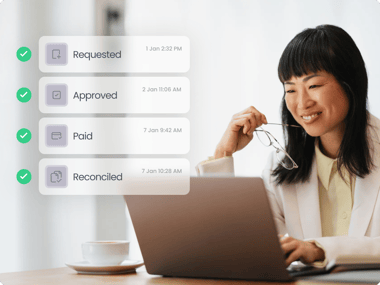
The accounts payable approval process is the controlled path a supplier invoice takes from arrival to authorised payment. It covers capture, validation against what was ordered and received, coding, routing to the right approver, the approval or rejection itself, posting to the ledger, and the separate decision to release funds.
To be worth calling a process, it has to survive two things: somebody leaving, and somebody asking about it a year later.
The first means the rules live somewhere other than one person's memory. The second means every step leaves a record of who approved, when, against which version of the document, and what they could see at the time.
Purchase orders sit upstream of all this. If you raise POs, most of the commercial decision was made before the invoice ever arrived, and approving the invoice is closer to confirming that what turned up matches what was agreed. Without POs, the invoice approval carries the whole decision by itself, which is why threshold design does more work in PO-less businesses. Raising the PO after the invoice lands is common enough, and it turns purchasing control into paperwork.
What does the process look like end to end?
Seven stages, and each sits inside the wider invoice approval workflow. Each stage has an owner, and each one leaves something behind.
| Stage |
What happens |
Typical owner |
Evidence it leaves |
| 1. Capture |
The invoice enters one system, from email, post or a supplier portal |
AP clerk or OCR capture |
Original document, arrival date |
| 2. Validate |
Matching to PO and receipt, duplicate check, tax and totals check |
AP clerk or automated rules |
Match result, exceptions raised |
| 3. Code |
GL account, tax rate, department, project or cost centre |
AP clerk or requester |
Coded transaction, before approval |
| 4. Route |
The invoice goes to approvers set by rule, in sequence or in parallel |
Workflow rules |
Routing history with timestamps |
| 5. Decide |
Approve, reject with a reason, or send back for information |
Budget holder, then finance |
Named approver, decision, comment |
| 6. Post |
The approved bill is written to the ledger |
Integration or AP clerk |
Ledger entry linked to the approval |
| 7. Pay |
Payment is scheduled and released by someone other than the approver |
Finance or treasury |
Payment record tied to the approval |
That is the sequence. The rest of this guide is about the parts that go wrong.
Where does the policy come from?
Write the policy first, then configure the software to enforce it.
We would always work in that order. Do it the other way round and you end up with whatever the tool made easy to build, and a year later nobody can explain to an auditor why marketing invoices route through procurement.
Tie authority to the spend, then attach people
Each rule should describe a decision the business is willing to delegate: commit operating spend in this category, up to this value. People get mapped onto it afterwards.
Job titles move around and teams get split. A rule pinned to "Head of Marketing" stops working the day that role becomes two roles, and nothing tells you it has. A rule pinned to "the budget holder for cost centre 4200" carries on working.
Do the same for the awkward cases while you are in there: who can approve spend with no purchase order, who signs off going over budget, and who has to approve a new supplier before a single invoice from them is paid. Our delegation of authority policy guide covers getting that on paper without producing twenty pages nobody reads.
A simple rule, and what happens to it
Say bills under $2,000 can be approved by the department manager, and anything above that also needs finance.
A $850 invoice: department manager, done.
A $6,400 invoice: department manager, then finance.
The point of a rule like that is that nobody in AP has to work out who should approve anything. The rule already knows. Taking that decision out of the inbox is worth more than it sounds, because it is the decision that gets made wrong on the day everyone is busy.
Almost nobody stays at that level for long. Give it eighteen months of growth and the policy starts reading more like this:
- agency and contractor invoices go to the department head whatever the value
- software renewals above $5,000 also need finance
- capital spend above $20,000 needs the CFO
- three named suppliers always get a second pair of eyes
- the second entity runs its own limits
- a department head can approve operating spend but cannot onboard a new supplier
- payment release is signed off by someone who did not approve the invoice
At that point you have a delegation of authority policy, whether or not anyone has called it one. The workflow now has to apply all of that consistently, including in August when half the approvers are away.
Set thresholds you can defend
A threshold is really a statement about how much scrutiny a decision is worth. Three or four bands is usually plenty:
- Low value, routine, matched to a PO. One approver, or automatic approval where the invoice matches the order and the receipt inside tolerance.
- Mid value. Budget holder, then a finance review before posting.
- High value. Budget holder, finance, then a director or executive.
- Anything unusual. New supplier, no PO, over budget, or changed bank details, routed to a named person whatever the amount.
One investment and business advisory firm running Xero uses exactly that shape: small invoices approved at level one, manager routing at level two, and anything over $1,000 going to the COO (customer-reported). The numbers are theirs, set against their own spend profile, which is the point. Borrowed thresholds are hard to defend when someone asks why the line sits where it does.
We would check two things before committing to any set of bands. Does the volume above each line stay small enough that senior approvers actually read what they are signing? And can the system spot an invoice that has been split in two so both halves sit underneath a limit?
Decide now what happens when an approver is away
Every policy needs a written answer for absence, because the unwritten answer is that finance approves it or the invoice waits until September.
Name a backup approver for each role, say whether the backup inherits the same limit, and set a time after which an untouched request escalates on its own.
What are the steps in the accounts payable approval process?
The accounts payable approval process runs in seven steps: capture the invoice, match it, code it, route it, decide, post it to the ledger, then release payment. Below is what each step actually requires.
- Capture the invoice into one place. Email, post and portal downloads all land in the same queue with the original document attached. Nothing gets approved off a photo in a chat thread.
- Match before you route. Two-way matching compares the invoice to the purchase order; three-way matching adds the goods received note. Set a tolerance for small variances so a 40p rounding difference doesn't consume a human decision.
- Code it before approval. Approvers judge better when they can see which budget the cost lands in, and posting is cleaner when the coding was reviewed as part of the decision rather than corrected afterwards.
- Route by rule. Supplier, amount, category and cost centre decide where the request goes, rather than the requester picking an approver. Send it in sequence where the second approver needs to see the first one's view, and in parallel where the two decisions are independent.
- Give approvers enough to decide. The document, the PO, the budget position, earlier comments, and a one-click way to reject with a reason. Most people who have to open three systems to check a bill will end up approving on trust.
- Record the decision. Approver, timestamp, document version, comment. Rejections matter as much as approvals here, because "why wasn't this supplier paid" is a question that comes back six weeks later.
- Release the payment separately. Approval authorises the liability. Moving the money is a second decision, made by a different person, against the approved record.
What should you automate, and what should stay a human call?
Automate the checks a rule can settle, and keep the judgements that depend on context. Ask whether a correct answer exists independently of who is answering it.
The checks we would automate: document capture and data extraction, duplicate detection, PO and receipt matching inside tolerance, threshold routing, budget checks against the current position, reminders and escalations, the audit log, and the sync into your accounting system. These are usually better handled automatically, with people picking up the exceptions.
Keep the judgement calls with people: whether the goods or services actually arrived and were worth the price, whether an exception should be granted, verification of any change to a supplier's bank details, and any invoice that fails matching.
Granting an exception decides whether the control held that day. Write down who is allowed to grant one.
We would use automatic approval only where an invoice is low value, matches a PO cleanly, comes from a supplier you have used for years and sits inside budget. Loosen any of those conditions and it stops being a control.
Five places approval processes break
1. The approval lives in an inbox
The decision happened. Proving it means searching an email archive months later, and the version of the invoice attached to the thread is rarely the one that got paid.
Chat approvals are worse, because nothing in a chat thread ties the yes to a document version.
2. One commitment arrives as two invoices
A $9,000 job comes in as two invoices of $4,500, each sitting just under the limit that would have brought in a second approver. Sometimes that is a supplier's billing schedule. Sometimes it isn't, and the only way to tell is to look for the pattern rather than at each invoice on its own.
3. Approvers cannot see what they are approving
An approver with no budget context and no document in front of them approves to clear the notification. Technically the control ran. In practice nobody reviewed anything.
4. Nobody covers the approver who is away
Requests sit until finance chases, then urgency starts outranking the rule. This is the failure that produces the phrase "just push it through, we'll sort it after".
5. The transaction changes after approval, or skips it
Amounts get edited. Bank details get updated. Coding gets corrected by somebody being helpful. And occasionally the bill goes straight into the accounting system and the workflow never sees it at all.
Approval only works as a control if the transaction that gets paid is the transaction that was approved. Weak spots like these are exactly what a structured set of accounts payable controls is built to close.
$104,000
median loss per occupational fraud case
The scale behind all this is documented. In Occupational Fraud 2026: A Report to the Nations, the ACFE analysed 2,402 cases across 143 countries and reported a median loss of $104,000 per case. Median schemes ran for 12 months before anyone caught them, while those found inside six months had a median loss of $40,000. Schemes found earlier tend to cost less, and a complete approval record gives finance and auditors something specific to inspect when a transaction is questioned.
How do you keep approval separate from payment?
Approving a bill and releasing the money are two decisions, and one person should not make both. Segregation of duties in accounts payable means whoever authorises the liability isn't the one who sends the funds, and neither of them is the one who set up the supplier's bank details in the first place.
That third piece carries more weight than it used to.
76%
of US organisations experienced attempted or actual payments fraud in 2025
The usual shape of it is a convincing email asking to update a supplier's bank account just before the next run. What answers that is a rule rather than vigilance: every bank detail change gets verified by a callback to a number you already held, recorded, and approved by someone who did not receive the request.
Plenty of small teams cannot separate all three roles, and pretending otherwise helps nobody. Use compensating controls instead. A monthly review of paid invoices against approvals by someone outside AP, alerts on edits made after approval, restricted access to the payment file. Then write down what you cannot separate and what you do instead, because auditors take a documented compensating control far better than a gap nobody had spotted.
Where ApprovalMax fits
We build accounts payable automation and approval software, so read this section as an explanation of where ApprovalMax fits and where it does not, rather than as neutral product advice.
ApprovalMax sits between your accounting system and your payments. Bills, purchase orders, expenses, supplier and contact changes, journal entries and sales invoices run through multi-level approval workflows before they reach Xero, QuickBooks Online or NetSuite. The rules take the shape described above: authority by role, thresholds by amount and category, steps in sequence or in parallel, backups for absence, and automatic approval only where you decide it belongs.
Four of the five failure points above have a specific answer.
Splitting and mismatches are caught by bill-to-PO matching, which runs two-way and three-way matching before an invoice reaches an approver. Budget controls put the budget position in front of the approver at the moment of the decision, which is the difference between a review and a rubber stamp. Segregation of duties keeps requesting, approving and paying in separate hands. And every request carries a time-stamped record of who approved what and when, so audit readiness becomes a matter of running a report rather than searching old inboxes.
Approvers don't need access to the accounting ledger. That matters when the budget holder is the right person to authorise a cost but has no reason to see the rest of the company's accounts, and it keeps the cost down, because approvers don't use up accounting-system licences.
Some of this differs by ledger, and flattening that would be unhelpful. On Xero and NetSuite, ApprovalMax can email administrators when a document has been approved directly in the accounting system instead of going through the workflow. On QuickBooks Online, a bypassed document still gets pulled in and flagged as not having followed the predefined workflow, but there is no equivalent admin email alert. The check for changes made after approval, covering amount, account, contact and category, runs across all three.
Payment execution is narrower than the approval coverage. ApprovalMax Pay is open to UK-based businesses using Xero: local payments through Open Banking with your existing bank account, or Wallets for paying suppliers in 30+ currencies across 150+ countries, in batches of up to 200. Everywhere else, approval happens in ApprovalMax and payment happens in your bank or payment provider, and the separation described above has to hold across two systems.
Other products will fit better in some situations: high-volume mass payouts to thousands of global suppliers, supplier tax onboarding and withholding across jurisdictions, corporate cards and employee spend management, and enterprise procurement suites for anyone running an ERP other than NetSuite. If your problem is payment infrastructure rather than approval control, start there instead.
One customer outcome is worth citing, and it is customer-reported rather than measured by us. A company that moved multi-layer purchasing approvals off email reported that the share of spend following the standard process went from about half to effectively all of it.
Free trial
See how ApprovalMax enforces approval controls automatically
No credit card required. Works with Xero, QuickBooks Online, and NetSuite.
Start free trial Book a demo
If you run this across a client portfolio
One business has one approval policy to think about. A practice can have twenty versions of the same problem, and no authority to make any of those decisions itself.
The trap is the practice becoming the forwarding service: receive the bill, work out who at the client should see it, send it on, chase the answer, then keep proof that the answer arrived. That is a service you cannot price properly and cannot scale.
The design question we would start with is whether each client can approve its own spend without practice staff sitting in the chain. ApprovalMax for accountants and bookkeepers is built around that split, with oversight across client organisations while the client's own people make the calls. It also keeps the service boundary clean: you run the process and advise on the controls, and the client's managers stay responsible for saying yes to their own spend.
Frequently asked questions
What is three-way matching in accounts payable?
Three-way matching compares three documents before an invoice is approved: the purchase order, the goods received note, and the supplier invoice. If quantity, price and totals agree inside tolerance, the invoice can move. Two-way matching drops the receipt, which suits services where no delivery gets recorded.
How many invoices should an AP clerk process per day?
There is no reliable universal benchmark, and the figures software vendors publish describe their own customers rather than a standard. Throughput depends on capture automation, PO coverage, exception rate and how many approvers are involved. Measure your own baseline first, then watch the exception rate rather than raw volume.
What should an accounts payable approval checklist include?
For each invoice: original document attached, supplier verified, no duplicate, matched to PO and receipt inside tolerance, coding checked, budget position visible, approved by someone inside their authority limit, decision time-stamped, and payment released by a different person. If you cannot show it later, it didn't act as a control.
A working approval process is boring
Nobody is chasing anyone. Nobody is deciding who approves what while a supplier waits on hold. When an auditor asks who signed off a bill in March, the answer takes a minute.
If finance is still doing any of that by hand, the workflow has left the work with you.
Most approval policies hold up fine in an ordinary week. The test is the awkward one: the budget holder away, an invoice with no purchase order, someone posting a bill straight into the ledger at 4pm on a Friday. Write the rules for those cases first and make the system apply them.
If you want to see what that looks like against your own spend, our accounts payable software covers the four stages from capture to payment.







 Ask Perplexity