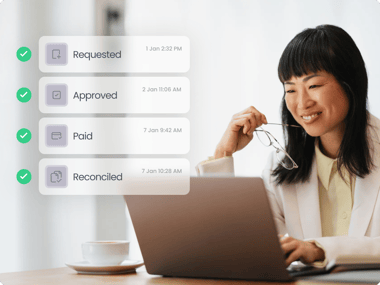
Every invoice goes through the same basic steps: you receive it, check the details, approve it and pay it. What changes is how these steps happen.

In a manual workflow, invoices often bounce around inboxes and spreadsheets. With an automated one, the system handles the routing and keeps everything on track. Manual approvals can feel manageable at first, but they quickly lead to delays and mistakes as invoices grow – especially if you work across multiple teams or entities.

In this article, we’ll review in detail what an invoice approval workflow is, why it’s important and how to get started. We’ll also cover the difference between manual and automated setups, so you can decide which is best for your business.

Key Takeaways

• Consistent workflows keep invoices moving even when teams are busy.

• Most approval delays happen because approvers lack context, not because they’re slow to respond.

• As companies grow, the approval workflow must shift from speed to structure and control.

• Automation compounds value when added in small steps.

• Strong approval workflows work because of clear rules, not individual effort or memory.

What is an invoice approval workflow?

An invoice approval workflow is the process an invoice goes through before it gets paid. It includes how invoices are received, checked, coded, approved, scheduled for payment and archived.

Documenting this workflow helps to set clear expectations, keeps the process consistent and gives everyone a clear way to move invoices through the business.
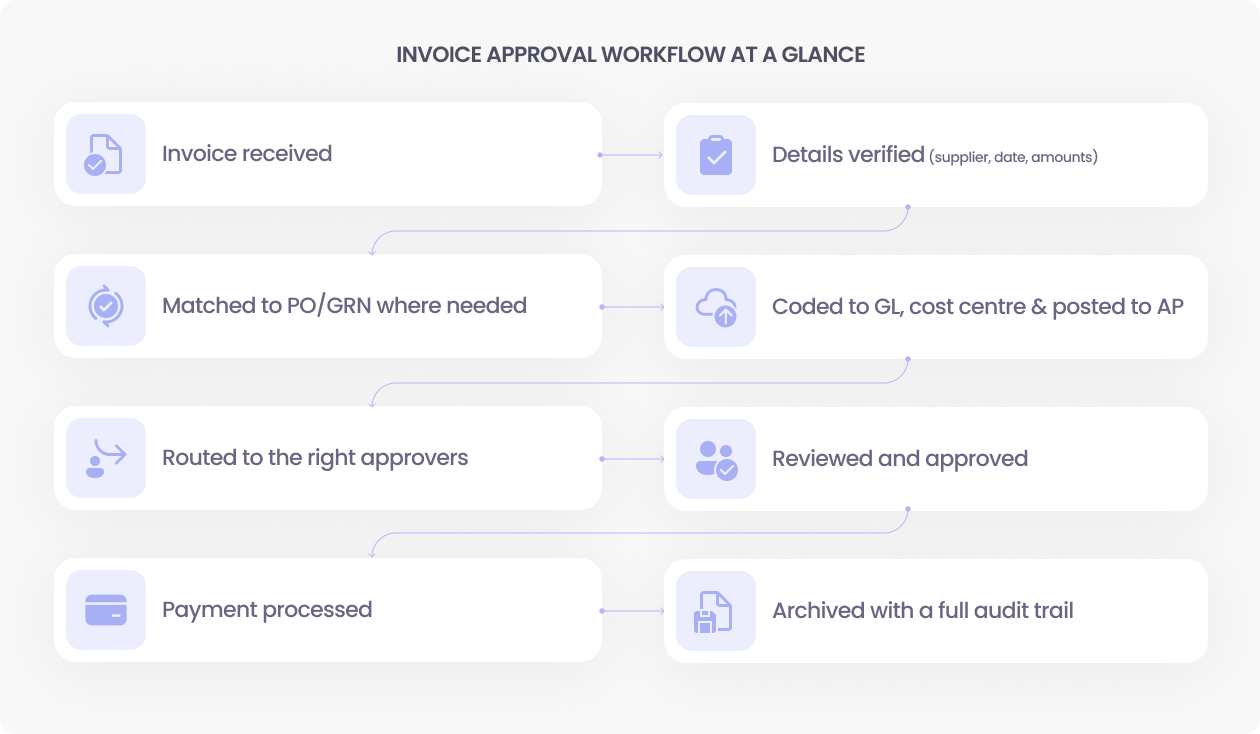
Invoice approval workflow

Why the invoice approval workflow matters

A clear invoice approval workflow protects cash flow, reduces mistakes and offers a reliable view of what the business is spending. Let’s take a deeper look at why it matters.

Reducing errors and overpayments

It’s easy to spot errors early when invoices follow a clear workflow, which means that issues like duplicate invoices and wrong totals are flagged before payment is sent

Protecting the business from fraud

Structured checks help you separate duties, validate vendor information and flag anything unusual. The process reduces the chance of getting caught out by fraud, like paying an invoice from an incorrect bank account.

Giving managers visibility into spending

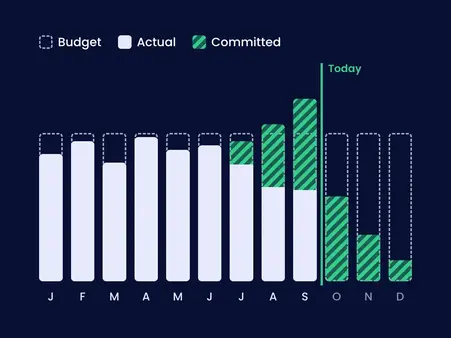
Managers see what’s waiting for approval and how much has already been committed. This makes it easier for them to keep budgets on track and act before any month-end surprises.

Speeding up payment cycles

No more missing invoices or waiting weeks for a response. With a workflow in place, approvals happen faster and accounts payable (AP) teams spend less time chasing updates, helping payments go out on time.

Improving compliance and audit readiness

Approval paths keep records of who approved what and when. This means finance teams spend less time pulling documents together at the last minute, and auditors get a clear, consistent trail.

Supporting cash flow and budget control

A predictable workflow gives early visibility into obligations. You know what’s coming before it hits the ledger, resulting in more accurate cash planning.

Strengthening vendor relationships

Approval workflows can also help vendors get paid on time and with fewer queries. As a result, disputes are removed and the relationships with vendors are improved.

Increasing accountability and control inside the business

Structure helps everyone understand their role and what they’re approving. This clarity makes problems easier to trace and resolve, instead of getting lost across emails and shared folders.

Step by step: How an invoice approval workflow works

An invoice approval workflow can be done manually, or you can automate it. The end goal is the same, but how you get there (and how much admin it creates) can look very different.

Step 1 — Invoice is received

  • Manual: AP downloads PDFs from email or collects paper copies.
  • Automated: Invoices arrive in a dedicated inbox and appear instantly in the system.

Step 2 — Verifying invoice details

  • Manual: AP checks supplier names, dates, totals and line items by hand.
  • Automated: The system extracts details automatically and highlights exceptions.

Step 3 — Matching to supporting documents

  • Manual: AP searches for matching POs, emails or delivery notes.
  • Automated: Matching happens automatically based on set rules.

Step 4 — Coding and GL allocation

  • Manual: AP assigns codes manually, which increases the chance of mistakes.
  • Automated: Coding follows presets or is applied based on vendor, cost centre or amount.

Step 5 — Routing the invoice for approval

  • Manual: AP emails documents to approvers and waits for replies.
  • Automated: Approvers receive tasks with all supporting information included.

Step 6 — Final approval and checks

  • Manual: Finance reviews coding and documentation before posting.
  • Automated: The system enforces threshold rules, escalations and final checks.

Step 7 — Payment processing

  • Manual: AP schedules payments directly in the accounting system.
  • Automated: Approved invoices sync automatically and sit ready for payment.

Step 8 — Archiving and audit trail

  • Manual: AP stores invoices across folders and names files manually.
  • Automated: Every invoice is archived with full approval history.

Who is involved in the invoice approval workflow? (role-based view)

Here’s a breakdown of roles likely to be involved:

Invoice approval workflow examples (by team size)

Invoice approval doesn’t look the same in every organisation. The core steps stay similar, but the people involved, the level of control and the risks change as the business grows.

Small business
Mid-sized business
Multi-entity organisation
Invoices land in one shared inbox
AP captures invoices in a system and checks coding and supporting documents.
Invoices are captured and assigned to the correct entity from the start
A bookkeeper or AP person checks details and forwards to the owner or manager
The workflow routes invoices to department managers for review
AP checks tax, coding and intercompany rules
Once approved, the invoice is posted and added to the next payment run
High-value items go to finance or a director before they are posted
Local managers approve, and group finance reviews high-value or high-risk spend
The workflow is simple but everything depends on one or two people being available and careful
This setup needs clear rules. Without automation it turns into long email chains and slow approvals
Approved invoices sync back to the right ledger and bank account, so each entity keeps its own audit trail and spend control

Manual vs automated invoice approval workflows

Manual workflows rely on people to move invoices forward. Automated workflows use rules to push invoices through each step, creating less data entry and manual work. 

Here’s a more in-depth comparison of the two:

Aspect
What it means for you
Automated workflow
Data capture
AP types details from PDFs
Data is extracted automatically
Routing and approvals
Emails and reminders are needed
Rules send tasks to the right approvers
Visibility
Hard to see where an invoice is stuck
Real-time dashboard for clarity
Error handling
AP spots mistakes manually
System flags duplicates and mismatches automatically
Fraud controls
Relies on people to spot issues
Offers built-in checks and separation of duties to reduce fraud
Audit trail
Files are stored across folders
Full history stored with each invoice

Common problems in manual invoice approval processes

Manual workflows slow down as invoice volume grows. You might find yourself spending more time searching for documents and chasing approvals, leading to delays and more work. Here’s why.

The problem
What it means for you
Long approval cycles and bottlenecks
Invoices sit in inboxes too long, delaying payments and creating avoidable backlogs.
Missing or inconsistent documents
Approvers can’t find supporting files, forcing AP to chase information and slow the process.
Incorrect coding
Manual entries lead to coding errors that cause rework and unreliable reports.
Duplicate or fraudulent invoices
Without checks, duplicate or suspicious invoices can slip through unnoticed.
No visibility into who is holding an invoice
Lack of tracking hides where invoices stall and makes follow-ups harder.

Benefits of automating invoice approvals

Invoice approval automation removes the manual work that slows teams down and replaces it with clear rules, faster routing and better visibility. Here’s how this can look day-to-day:

Automated routing and rule-based approvals

Instead of invoices sitting in inboxes, automation routes them to the right person immediately. Approvers get clear tasks, reminders and the context needed to act quickly.

Real-time visibility for managers

Managers can see the status of every invoice, what’s committed and what’s waiting for approval. This removes the uncertainty that comes from missing documents or unclear ownership – and makes budget tracking easy.

Faster approval cycles

Automation prevents invoices from getting stuck. Approvers receive supporting documents and notes upfront, so they can make decisions without delays or extra questions.

Fewer errors and reduced exceptions

Repetitive data entry disappears with automated coding rules, PO matching and vendor checks. This reduces mistakes and stops exceptions from piling up at month-end.

Better audit trails and document history

Every step of the workflow is logged automatically. Supporting documents, approvals, comments and coding changes sit in one place, giving auditors and controllers a complete and consistent record.

Integration with Xero, QuickBooks Online, and ERPs

Automation means invoices easily move between the approval workflow and your accounting ecosystem. Data stays aligned across systems like Xero, QuickBooks Online or your ERP without manual updates.

Proof it works: automated invoice approval in practice

Here are a few ways finance teams have changed the game once their invoice approvals became clear and consistent. Each story shows what happens when approvals stop living in inboxes and start following a simple, visible path.

Muscular Dystrophy UK: 70% quicker payment prep and 43% lower costs

Moving from Word forms and email trails to a cloud-based approval process helped this charity cut the time to prepare batch payments from half a day to under 30 minutes, a 70% reduction. They process about 200 invoices a month, reduced software and processing costs by roughly 43%, and stay audit-ready with everything in one place.

The Icehouse: 80% faster approvals and 40 hours a week back

An investment firm processing around 400 invoices a month swapped a paper-based system for a multi-level automated approval matrix. Approval times dropped by up to 80%, the team gained back more than 40 hours every week, and the change is worth an estimated $62,400 NZD in yearly savings, or about 7,900 percent ROI.

Le Contrôleur: 70% less time on client AP and safer remote approvals

For one remote construction client with up to 650 invoices a month, automation replaced slow, email-based approvals that often took 15 days. The firm now spends about 70% less time on that client’s AP work, approval times are cut by more than half, and the workflow closes fraud gaps that came with ad hoc email sign-offs.

Implementing invoice approval automation

Automation delivers the best results when you build it one step at a time. Here’s how to lay the groundwork and move forward with confidence.

1

Assessing your current invoice approval process

Start by mapping your existing workflow, from invoice receipt to payment. Look for delays, manual handoffs, missing documents and repeated work. This helps you identify where automation can have the biggest impact.

2

Defining rules, thresholds, and roles

Next you’ll need to decide:

  • who approves what
  • at which amounts
  • under which conditions

Set thresholds for escalations and document any exceptions, such as new vendors or high-value invoices. This is important when creating a new invoice approval workflow.

3

Defining rules, thresholds, and roles

Pick a tool that works with your accounting system and supports your approval structure. Can it handle routing, document matching, coding rules and multi-entity needs without extra admin?

4

Rolling out, training, and iterating

Finally, choose a small group or entity to begin with. Train approvers so they know how the workflow works and what’s expected of them. Gather feedback, refine your rules and then you’ll be ready to roll it out company-wide.

Best practices for a reliable invoice approval workflow

A reliable workflow doesn’t happen overnight. Follow these best practices to keep everything running smoothly.

What to do
What it means for you
Keep approval paths short and clear
Too many layers slow everything down, so only include the people who genuinely need to approve.
Use thresholds so senior approvers only see high-value invoices
This keeps their workload focused on the decisions that carry real financial risk.
Give approvers full context before they decide
Include the PO, coding, vendor history and supporting documents so approvers can make quick and accurate decisions.
Track bottlenecks regularly
Review where invoices slow down and fix recurring issues before they affect payment timelines.
Automate repeat steps where it makes sense
Use automation for coding, routing and document checks to reduce mistakes and speed up the process.
Keep vendor and approver data clean and up to date
Regularly update vendor records and approver lists to make sure invoices don’t get stuck.
Build in extra checks for high-risk invoices
Apply extra reviews to invoices that carry more risk to protect against fraud and incorrect payments.

Key metrics to track

Here are a number of key metrics that show whether your invoice approval workflow is actually working and adding value to your finance process.

KPI
What it measures
Business impact
Invoice cycle time
How long it takes from invoice receipt to approval.
Shorter cycles improve cash planning.
Exception rate
The percentage of invoices that require manual work.
Lower rates mean fewer errors and a better overall process.
Touchpoints per invoice
Measures how many times AP or approvers interact with an invoice.
Fewer touchpoints suggest better automation.
On-time approval percentage
Shows how many invoices move through the workflow before payment deadlines.
Higher percentages = a smoother workflow with fewer delays.
First time approval rate
The percentage of invoices approved without rework.
Higher rates suggest stronger processes.
Percentage of invoices matched to a PO
Shows how many invoices link correctly to a purchase order.
Higher matching rates suggest a more consistent and controlled process.
Percentage of invoices fully automated vs touched by AP
Tracks how many invoices move through the workflow without manual work.
Higher automation levels suggest fewer exceptions and a more efficient process.

Final word

A good invoice approval workflow does more than move invoices from A to B. It gives you a clear view of what you are spending, who is signing off, and where things get stuck. That helps you protect cash, reduce errors and avoid last minute surprises at month end. Start with mapping what really happens today, tidy up the weak spots, then use automation to make that process easier to follow every day.

How ApprovalMax can help

If you want these ideas working in real life, tools matter. ApprovalMax gives you invoice approval software that sits on top of your accounting system as part of a wider AP automation software stack. You define the rules, and our approval workflow software routes invoices to the right people while keeping segregation of duties in accounts payable intact.

If you’re ready to see how this looks in practice, start a 14-day free trial and test it with a few real invoices.

FAQs

What is invoice approval?

Invoice approval is the process of checking an invoice before it gets paid. Someone confirms the goods or services were delivered, the details are correct, and the spend fits your budget or policy. Only then does the invoice move to payment.

What is the difference between invoice approval workflow and invoice approval process?

The invoice approval process is what needs to happen: check, confirm, approve, and pay. The invoice approval workflow is how those steps are organised in real life – who does what, in which order, and with which rules or tools.

What documents are required to approve an invoice?

At a minimum, approvers need the invoice itself and enough context to confirm it’s valid. This often includes a purchase order, quote, contract, or delivery note, plus any internal approvals or emails that show the spend was agreed.

Can small businesses use approval workflows?

Yes. In a small business, an approval workflow can be as simple as one check by the owner or manager before payment. Even a light process reduces the risk of paying incorrect, duplicate, or fraudulent invoices.

Why is the invoice approval process important?

A clear approval process helps prevent errors, duplicate payments, and fraud. It keeps spend within budget, supports accurate reporting, and creates an audit trail showing who approved each invoice and when.

How can automation optimise the invoice approval workflow?

By moving invoices through the workflow using rules instead of email chains. It captures invoices in one place, applies coding and matching rules, routes tasks to the right people, and keeps a full history, which cuts delays and manual work for AP.


justin_campbell_avatar

Justin Campbell, an experienced accountant with a decade at Xero, blends his deep understanding of finance and technology to simplify processes. He uses his expertise to help businesses work smarter, bringing precision and innovation to every initiative.

Register to attend