




 Ask Perplexity


Most AP teams use both automation and AI without distinguishing between them, which leads to mismatched expectations and frustrated results.
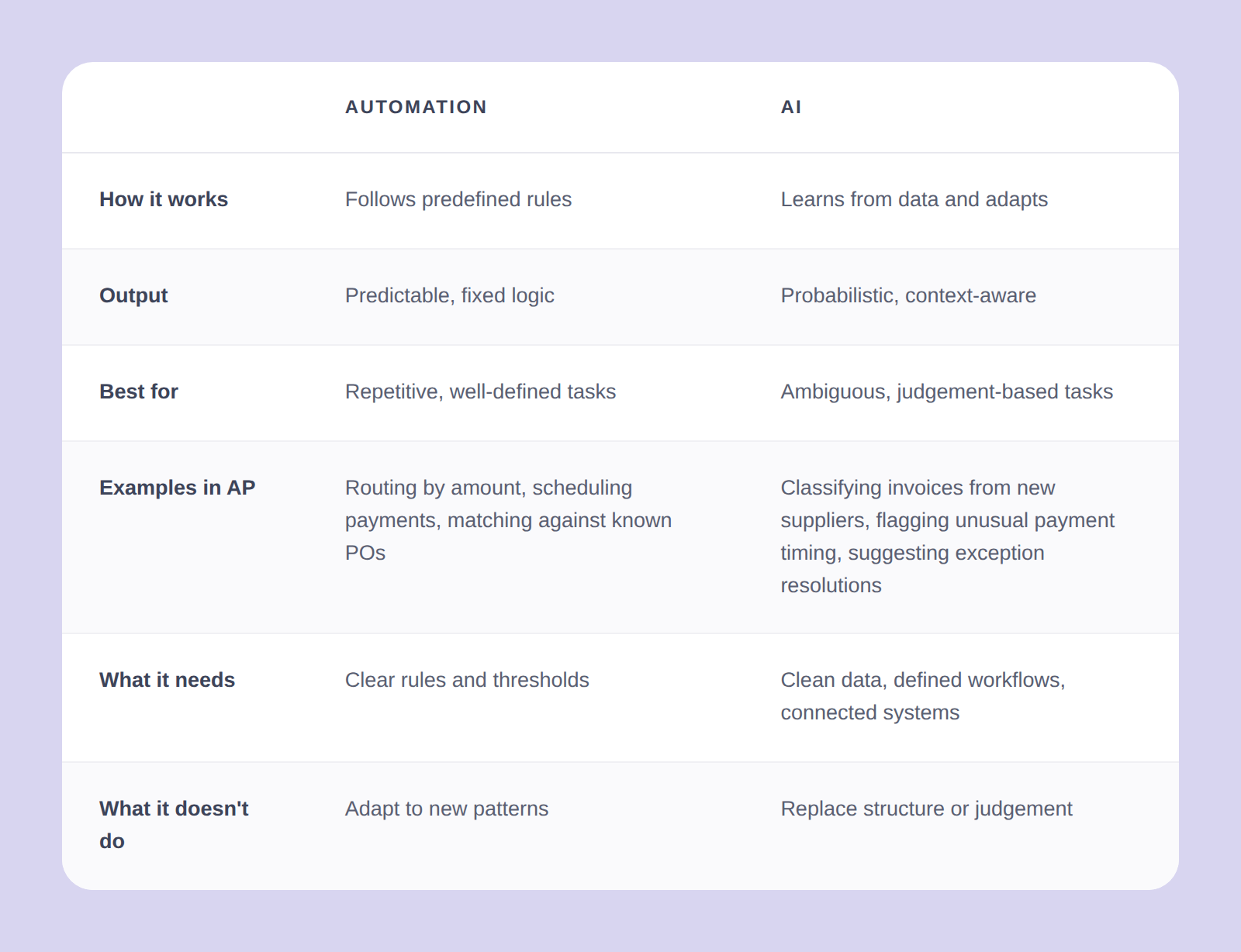
Automation follows predefined rules. If an invoice matches the purchase order within tolerance, approve it. If the amount exceeds a threshold, escalate it. The output is predictable because the logic is fixed. Automation handles repetitive, well-defined tasks well: routing, scheduling, matching against known rules – it does not adapt.
AI learns from data and handles ambiguity. It can classify an invoice from a supplier it has never seen before, flag a payment timing that looks unusual compared to historical patterns, or suggest an exception resolution based on how similar exceptions were handled in the past. AI adapts, but it needs data to learn from, and it needs structure to operate within.
The relationship matters: automation creates the structure that AI needs to work well. Without defined workflows, consistent data, and connected systems, AI is processing noise rather than signal. Most modern accounts payable automation software combines both layers, but they serve different purposes and should be evaluated separately.