



 Ask Perplexity


A centralised approval workflow routes every financial document routes bills, purchase orders and expense claims through one set of rules rather than three separate processes. Across more than 21,000 organisations, the average workflow runs 2.4 steps and around 85% route conditionally by amount, supplier or account. The most effective setups combine value-banded routing, a named backup for every rule, and an approval record attached to the transaction itself.
Rod Mourant runs accounting for PartnerHero across seven entities and six countries, with 90 people who approve things. Before he centralised, his team approved bills over Slack. The volume forced a decision that most finance teams will recognise: “We had to really set our approval limits very high because we couldn’t run every invoice through a Slack message to get approvals because it would have been overwhelming.”
Most people assume the cost of scattered approvals is the chasing. It isn’t. The real cost is that a manual process quietly pushes you into weakening your own controls, because that’s the only way to keep the business moving. You raise the threshold until the volume becomes manageable, and everything underneath it goes through unexamined.
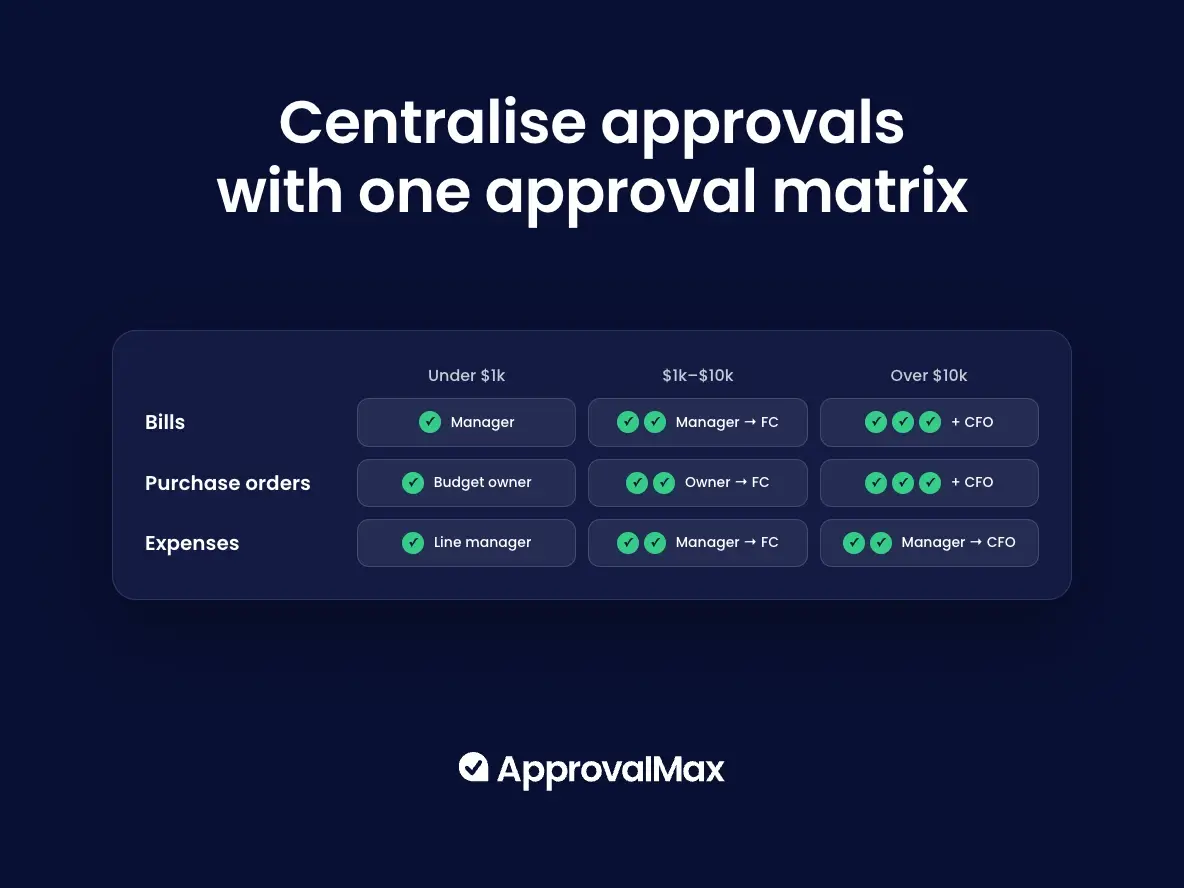
An approval matrix is a table that states who approves what, up to which value, for each type of document. It replaces an approval policy written in prose with something unambiguous: one row per value band, one column per document type, and a named approver in every cell.
Where a band needs more than one signature, the row describes a multi level approval workflow: the document moves to the second approver only once the first has signed off. An accounts payable approval matrix is the same table limited to bills.
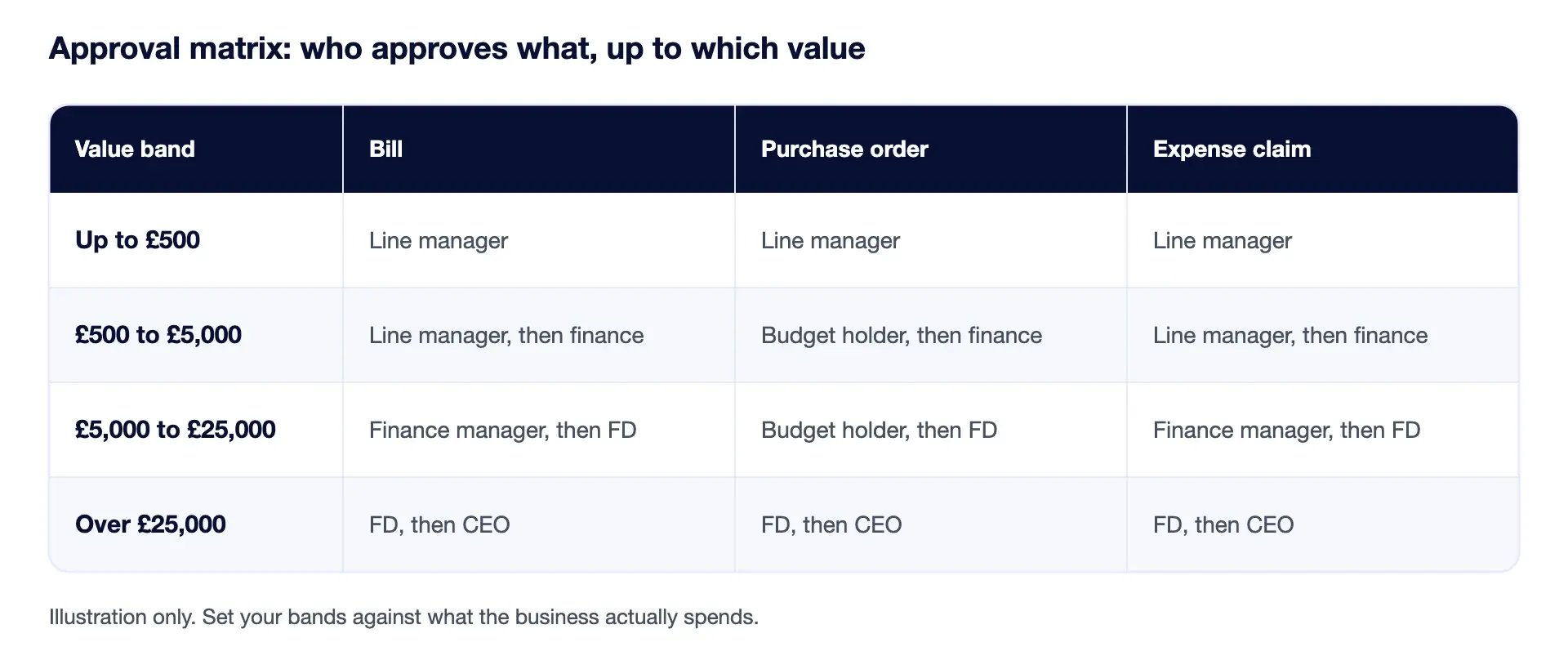
Those bands are an illustration, not a recommendation. Set yours against what the business actually spends. Once the matrix is agreed, an approval workflow is what enforces it, and an invoice approval workflow applies the same rules to bills as they arrive.
Having a centralised approval matrix means every document that needs sign-off moves through one set of rules, rather than three processes that grew separately. One approval matrix, defined once, applied to bills, purchase orders (POs) and expenses alike.
The practical test is whether you can answer a simple question without asking anyone: who approved this, when, and under what rule? If answering takes a search through someone’s inbox, the approvals aren’t centralised, whatever the policy document says.
Raising your approval limit to cope with volume leaves more spend unchecked. Worse, it leaves unchecked the particular spend most likely to be a problem.
“In our experience, fraud in smaller businesses is based on thousand dollar amounts or less. If approvals are run via email, it is tempting to only authorise invoices over a certain margin. As a result, a lot of lower value transactions go unnoticed just because there is no fast and convenient way to approve them.” — Felix Latour, Director of Operations, Le Contrôleur
Every finance team we speak to has drawn that line somewhere. The line exists because email approval is slow, not because the spend below it is safe. PartnerHero’s second sentence is the one that matters: “With ApprovalMax, not only were we able to automate that whole process, it could then post those into QuickBooks for us to eliminate the manual side of it, and we could then set much lower limits.” The payoff of centralising isn’t only speed. It’s that you can afford tighter thresholds than you could before.
We looked at aggregated, anonymised production data covering the 12 months to July 2026, across organisations using ApprovalMax.
If your process sends every bill to one approver regardless of what it is, you’re in a shrinking minority. We also asked North American customers which benefits they had actually realised. Of 49 respondents, all on QuickBooks Online: 94% cited visibility of in-progress approvals, 84% the ability to delegate approval authority, 78% faster AP approvals, and 45% auditor access when they get audited. Visibility came out ahead of speed, which is not what most teams expect when they start looking.
This is where most AP teams spend their time and where the common control failures sit. A centralised invoice approval workflow routes each bill on its own characteristics, such as amount, supplier, account and tracking category, rather than on whoever remembers to forward it.
Duplicate detection runs alongside. ApprovalMax flags bills that match an existing record on supplier, date and amount, or on supplier and reference, and warns the requester, reviewer and every approver in the chain before anyone signs off. It’s a warning rather than a block. The decision stays with the person making it, which is the point.
Approving spend before it’s committed is the only control that works in advance rather than after the fact. Without purchase order approval, the first time anyone examines a commitment is when the bill arrives and nobody remembers authorising it. Centralised PO approval also makes bill-to-PO matching possible later. On Advanced and Premium plans, an incoming bill is matched against the original PO before approval. NetSuite adds three-way matching against the item receipt.
Expenses work differently on each platform, and it’s worth being precise. On QuickBooks Online, the Expense workflow covers purchases already paid by cash, cheque or card. On Xero, expense claims are employee reimbursements, split into out-of-pocket claims that become bills and corporate card claims that become spend money transactions. On NetSuite, ApprovalMax pulls expense reports already sitting in pending approval. The mechanics differ, but the principle holds across all three: a claim routes on its own attributes rather than going to whoever sits nearest.
Auditors examine whether the person who requests a purchase is the same person who approves it. Most approval tools address this to some degree. Fewer address the larger version of the same question.
If one platform routes the approval and executes the payment, initiation, authorisation and disbursement all sit with a single vendor. That’s a concentration of control, and it’s the thing segregation of duties exists to prevent.
ApprovalMax doesn’t move your money. It sits as an approval layer on top of Xero, QuickBooks Online and NetSuite, which means your bank and payment rails stay exactly where they are and the authorisation step is the only thing that changes. Requester is a condition in the approval matrix, so you can configure a step that routes past whoever raised the request.
“We’re essentially encoding their controls so they can’t be overwritten by an urgent email request, or a moment of pressure.” — Trina Clairmont, Director of Business Transformation and CPA, The Corner Office (CFO)
Most control failures happen exactly like that. Not fraud, not negligence, just a moment of pressure and a process that bends.
Email is still how most approvals happen, and it fails in a specific way. Not refusal, disappearance. One finance manager at a five-site care group described it as: six months later an auditor asks you to find the email that approved a payment, and with all the will in the world you can never find them when you want them.
The variant worth naming is that approvals have started migrating out of email altogether, into Slack, Teams and WhatsApp. As one finance lead put it about their own process: it’s all on Slack, and it’s not very audit-proof either.
Approvers in ApprovalMax work from email, the web app or the mobile app. They don’t need a Xero, QuickBooks Online or NetSuite licence, and they don’t see the rest of the ledger, only the document, its attachments and the approval history. That’s a licensing saving and a least-privilege control at the same time. It also answers an objection finance teams raise more often than you’d expect: give an approver access to the ledger and they can see every draft invoice in it, including ones that are none of their business.
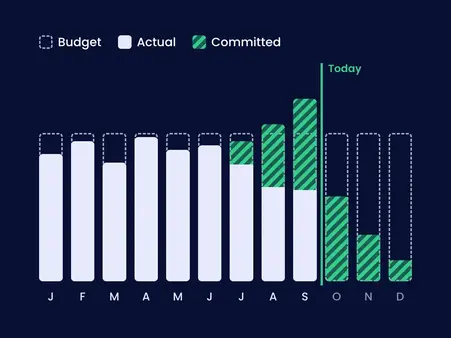
Approval limits control who signs off. Budget checking controls whether the money exists. ApprovalMax shows budget status to the approver while they’re deciding, colour-coded, and accounts for amounts already approved and still in flight.
Worth knowing how current the figure is: Xero budgets sync daily, QuickBooks Online and NetSuite hourly. Amounts in another currency convert to the organisation’s base currency for the check.
ApprovalMax generates an audit report as a PDF when a document receives final approval, showing the full approval history with names and timestamps. The record is tamper-proof: nobody can go back and edit who approved what, or when. For documents originating in Xero or QuickBooks Online, the report uploads automatically and sits with the transaction, so the evidence is already attached before anyone asks for it.
“One click, you can see everything: who approved it, the attachments, the dates it was requested and paid, all the trails you need.” — John Mata, Regional Finance Manager, Anytime Fitness Trailblazers
If your approvals currently run on email, the fastest thing you can learn is what your real approval compliance rate is. Most teams assume it’s close to 100%. BMI Group’s was 50%.
An approval workflow routes a financial document to the right people in the right order, based on rules you define, such as amount, supplier, department or account. It replaces forwarding by memory with routing by policy, and records each decision as it happens.
No. Approvers act from email, the web app or the mobile app, and see only the document and its attachments. They don’t need a Xero, QuickBooks Online or NetSuite licence.
ApprovalMax doesn’t rewrite your ledger. Your chart of accounts, contacts and existing records stay as they are. It adds an approval step before a document reaches them, then posts the approved document with its audit report attached.
You nominate a substitute, either as an administrator or through the approver’s own out of office setting, and their queue routes to that person for the period you set.
Across 21,000+ organisations, the average workflow runs 2.4 steps. Match the number of steps to the risk of the transaction. More levels on everything slows the queue and encourages approvers to clear it without reading.