



 Ask Perplexity



Managing bill approvals across multiple client entities means standardising one approval baseline and adapting it per client, rather than rebuilding from scratch each time. The practical steps are: document each client’s existing rules, define who approves at what value, copy a template workflow into each new organisation, and route approvals so the client signs off rather than the firm. Approvers act from email without needing a licence for the accounting system.
Two firms, on opposite sides of the world, describe the same moment.
“Often, people say they have an approval process and then when you dive in, they realise it’s not as well structured as they think.” — Carl Ferner, Partner, BDO New Zealand
“When we ask clients ‘who approves what’ they suddenly realise their processes are flawed. It’s a good wake-up call for a lot of clients to consider what structure they actually need.” — Peter Sean Magner, Sales and Marketing Director, Iridium
“Who approves what” is the question that starts this whole piece of work, and you already know the answer you’ll get. What follows is how firms turn that answer into something they can run across a whole client book without building it from scratch every time.
Managing AP for one client is a process. Managing it for forty is a different job, because every client has its own thresholds, its own approvers and its own idea of who should be involved. In our 2025 survey of 166 finance professionals, one in five named managing multi-entity or complex approval structures as their single biggest challenge with financial controls.
The firm-side symptom is chasing. Not chasing your own team, but chasing clients. Helina Patience of Entreflow put a number on it on one of our webinars, and it’s the number most firms don’t measure:
“I hate chasing clients for things, I’ll just say that out of the gate here. Easily 10% of our time on a client could be wasted chasing documents that we need.” — Helina Patience, Entreflow, speaking on an ApprovalMax webinar
This is the part worth getting right before anything else, because a control nobody uses is not a control.
“My clients have said being able to just click a button to accept or reject, from an email or on the website, makes approving expenses so much easier.” — Stephanie Cooper, Controller, CHARITYacCOUNTS!
Your client’s approvers, the directors, department heads, trustees, budget holders, most work from the email notification, the web app or the mobile app. None of them needs a Xero or QuickBooks Online licence, and none of them sees the rest of the ledger. You’re not asking a client to adopt your software. You’re asking them to press a button in an email.
Firms usually adopt approval software to save time. They keep it for a different reason.
“It helps me sleep better at night. Putting this in place reduces risk as the client is the approver, based on their rules. To me that is massive.” — Brendan Lucas, Founder and Managing Director, Next Dimension Accounting
When approvals run through email, the firm is the de facto control. You’re the one deciding whether a bill has been authorised properly, usually on incomplete information, usually under time pressure. When approvals run through a documented matrix that the client signed off, the authorisation decision sits with the client, evidenced, every time.
BDO New Zealand take it a step further, and this is the version worth reading twice:
“Some clients get us to manage the entire approval matrix in ApprovalMax to ensure there are strong controls. That way even the CFO can put their hand up and say ‘I can’t just mess with it myself’ if they have stringent audit needs.” — Carl Ferner, BDO New Zealand
The firm holds the controls so the client’s own finance leadership can demonstrate they aren’t able to override them. Very few firms currently charge for that, and most of them could.
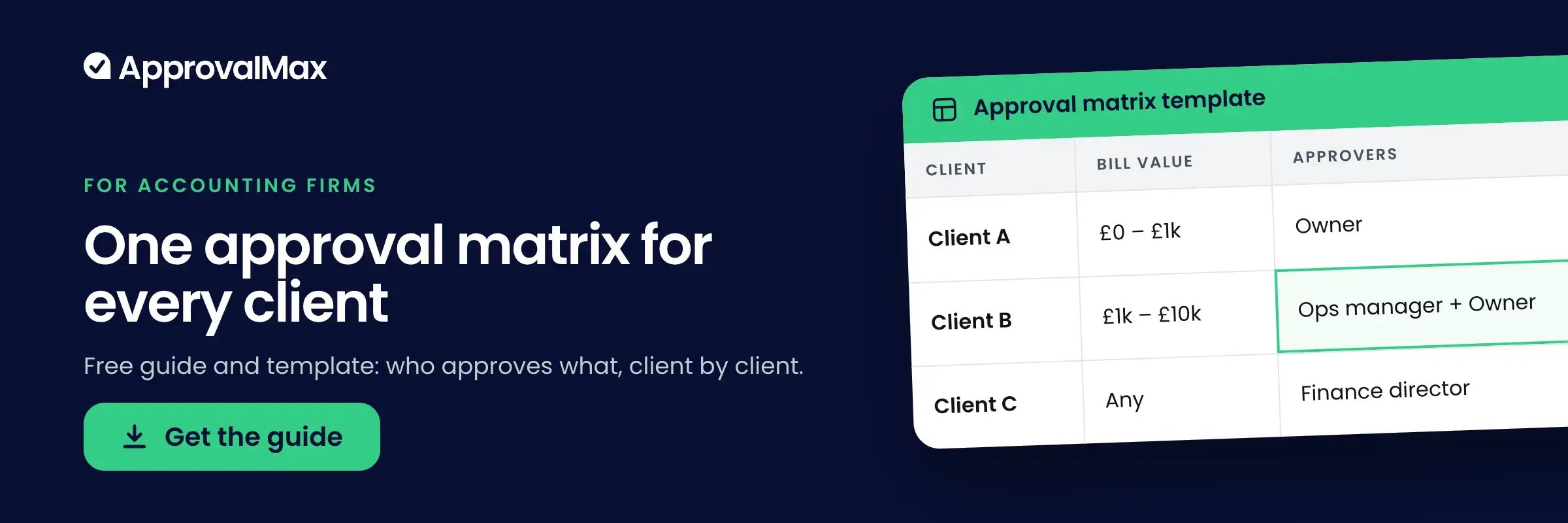
The practical mechanism is straightforward. Design a baseline workflow that reflects your firm’s minimum standard: how many approval steps, default thresholds, and a step that routes past whoever raised the request. Then copy it to each new client organisation and adjust.
In ApprovalMax, one Organisation is one entity in your accounting system, and workflow copy moves a setup between organisations under the same account. Four things to know before you use it:
So copy into new organisations freely, and treat copying over a live client’s existing workflow as a deliberate act rather than a shortcut. More on the mechanics in approval workflows.
These are not pilot numbers. The capacity released tends to go somewhere specific:
“For our team, it’s the time savings; they’re significant. We spend less time chasing approvals and reconciling who authorised what, which gives us more time to focus on the high value advisory work. Business owners are more engaged in their financials because approvals land directly in front of them.” — Trina Clairmont, Director of Business Transformation and CPA, The Corner Office (CFO)
Several firms have stopped treating approvals as overhead:
“ApprovalMax has allowed us to offer a new service – accounts payable. Realistically, if we didn’t have it, we wouldn’t have been able to build the business to where it is.” — Brendan Lucas, Next Dimension Accounting
Next Dimension now have 81% of their clients with multiple approvers running ApprovalMax, and doubled the business in two years. Productising AP as a service is the commercial version of this article, and it’s worth reading alongside. For the wider process context, see what accounts payable management involves.
It’s the most common objection we hear at practice events, and it’s worth answering honestly rather than arguing with it.
A one-person business with no second approver genuinely doesn’t need an approval matrix. But the threshold is lower than most firms assume. The trigger is the moment a second person needs to authorise something, yet there is no process. CHARITYacCOUNTS! run clients processing anywhere from 4 to 314 transactions a month on the same setup. Cloudfox average 66 documents per client per month.
If a client has one person raising bills and a different person who should be signing them off, the case exists regardless of size. If they don’t, it doesn’t.
Each approval decision is recorded with the approver’s name and a timestamp, and the audit report PDF attaches to the document in Xero or QuickBooks Online when it receives final approval.
“The full audit trail is something we heavily rely on as an outsourced CFO team. It gives us the ability to review exactly who reviewed and approved what and when.” — Trina Clairmont, The Corner Office (CFO)
Worth knowing on the reporting side: cross-company reporting across organisations is available for Xero through the public API. For QuickBooks Online, reports are scoped to a single organisation, so consolidated reporting across a client book means exporting per entity for now. It doesn’t change how you set up approvals, but it changes what you promise a group finance director about month-end.
More on running approvals across a client book: ApprovalMax for accountants and bookkeepers and ApprovalMax for multi-entities.
No. Approvers work from the email notification, the web app or the mobile app, and see only the document and its attachments. They never log into the accounting platform.
Yes. Workflow copy moves a setup between organisations under the same account. It overwrites the target workflow and can’t be reversed, and auto-approval and review steps aren’t carried over.
One organisation is one entity in your accounting system, licensed per organisation with unlimited users. Volume discounts start at five organisations on a single subscription.
The organisations dashboard gives a single view of every organisation you can access, with request activity, subscription details and connection status. Cross-company reporting is currently Xero-only, through the public API.
The client’s nominated approver makes and evidences the decision, under rules they agreed. That is the practical difference from email approvals, where the firm ends up as the de facto control.