Procurement Automation: Workflows, Benefits, and Implementation Steps
- What is procurement automation?
- Which procurement workflows are improved by automation
- How procurement automation works in practice
- Benefits of procurement automation
- How to choose the right procurement automation software for your business
- Procurement automation implementation checklist
- Common setup mistakes in procurement automation and how to avoid them
- Controls and compliance in automated procurement workflows
- How ApprovalMax can help
- FAQs
In many organizations, procurement and accounts payable work toward the same goal but rarely from the same picture. Procurement focuses on getting things approved and ordered. Accounts payable focuses on paying invoices correctly and on time. The handover between the two is where friction often appears.
When procurement runs on emails, spreadsheets, and informal approvals, that friction grows quickly. Requests move forward without full context. Approvals happen in inboxes. By the time an invoice reaches finance, it is not always clear what was approved, who signed it off, or whether it still fits within budget. Research from CIPS shows that manual procurement processes often lead to poor visibility over spend and weaker control as purchasing activity increases.
Procurement automation addresses this gap. It connects purchasing activity with downstream finance processes so decisions made earlier do not get lost later. Approvals, purchase orders, receipts, and invoices stay linked. Procurement and finance teams work from the same information instead of reconstructing it after the fact.
• The bottom line: Procurement automation connects purchasing decisions to accounts payable, so approvals, orders, and invoices stay linked instead of being reconciled after the fact.
• Why it matters: It gives finance and procurement a shared view of spend, reduces rework and exceptions in AP, and keeps control in place without slowing teams down.The results are measurable. Research from The Hackett Group shows that digitally enabled procurement teams process purchase orders in less than half the time of lower performers. These gains come from automation and standardized workflows, not extra effort. Faster processing also reduces rework in accounts payable and improves audit readiness.
In this guide, we explain what procurement automation is, which workflows it improves, and how it supports stronger control across the procure-to-pay process. We also look at the benefits for both procurement and finance teams, and outline practical steps for getting started.
What is procurement automation?
Procurement automation uses software to run repeatable procurement tasks and approvals through digital workflows, rather than relying on emails, spreadsheets and manual handoffs.
It typically covers the core steps in the procure-to-pay process:
- Purchase requisition
- Approval workflow
- Purchase order (PO) creation
- Receiving
- Invoice matching (2-way or 3-way)
- Reporting
Payment may still sit in a separate system, depending on your setup.
Procurement automation replaces manual data entry, email chains and spreadsheet tracking with connected workflows. Instead of piecing information together manually across systems, everything moves through one automated process. This cuts down errors, shortens cycle times and gives you clearer visibility over how and when spending enters the business.
Which procurement workflows are improved by automation
Automation doesn’t remove people from procurement; it simply removes manual handoffs.
Instead of chasing approvals or re-entering the same data, the system routes work, applies rules and keeps records connected. Your team still makes decisions, but these decisions are made faster and with better context.
Here’s what procurement automation typically covers:
The fastest wins in procurement automation usually come from approval routing, PO creation and invoice matching. This is because these steps remove the most friction with the smallest changes in process.
How procurement automation works in practice
Here’s what a typical automated procurement process looks like:
- Someone submits a purchase requisition
- The system routes it through the approval workflow based on value and department
- Once approved, the system creates and sends a PO
- Goods or services are received and logged
- The supplier invoice arrives and is matched to the PO (and receipt if required)
- If something doesn’t line up, the system routes the exception
- Reporting updates automatically
The key difference is that everything is connected. The purchase requisition, purchase order, receipt and invoice all link together in one simple workflow. When something is missing or delayed, you can see it immediately. Approvals and matching no longer rely on guesswork, so the process keeps moving.
Benefits of procurement automation
Faster approvals and less chasing
Procurement teams typically notice the benefits first. Approvals move faster because the system routes requests automatically and sends reminders when action is needed. This means you stop chasing emails and spend more time reviewing real decisions.
Fewer errors
Errors are reduced because fields are validated and information is reused across documents instead of being retyped. Supplier details, prices and coding carry through from purchase requisition to PO to invoice, which cuts down mismatches and rework.
Better coordination and visibility
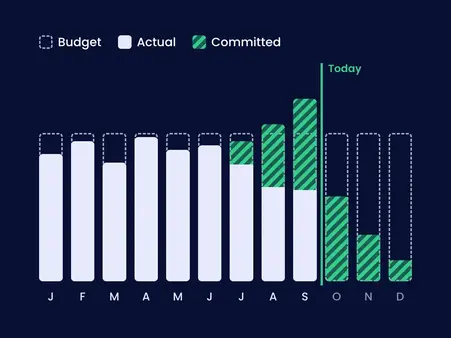
Coordination also improves since everyone works from the same view. Requesters can see where their purchase sits, finance sees what’s committed and procurement sees what’s approved but not yet ordered.
Here’s an example: A purchase requisition routes itself based on department and value. A manager approves it on their phone and the PO goes out the same day. No spreadsheets or email chains are needed.
These benefits don’t come from working harder, they come from removing the manual steps that slow procurement down.
Stronger control and audit-readiness for finance teams
For finance leaders, the value shows up in control and insight. Procurement automation supports spend control by steering buying toward preferred suppliers and approved categories. As a result, off-policy purchases become harder to slip through the net.
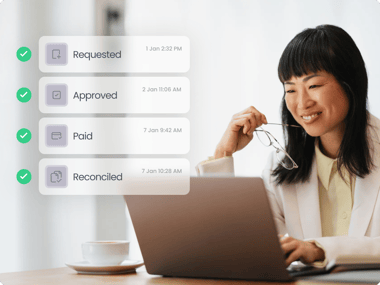
Procurement automation also improves audit readiness. You get a clear trail from request to approval to PO to invoice. This reduces time spent explaining decisions later.
Better data, lower costs and aligned teams
Better data also supports better decisions. Spend analysis becomes easier, supplier performance patterns become visible and forecasting inputs improve because commitments show up earlier.
There’s also a cost benefit to consider. Research from The Hackett Group shows that top-performing procurement organizations operate at around half the cost per purchase order compared to lower performers, largely due to automation and standardized processes. Fewer disputes mean fewer reworked invoices. On top of this, faster approvals can unlock early-payment discounts, and processing efforts drop as manual steps disappear.
Most importantly, procurement and finance start working together from the same information. Standardized workflows align purchasing activity with financial control instead of pulling them in different directions.
How to choose the right procurement automation software for your business
When looking for procurement automation software, it helps to work through a simple checklist tied to your actual workflow:
Procurement automation implementation checklist
Common setup mistakes in procurement automation and how to avoid them
Even good tools fall short if the setup misses the basics. These are some of the most common issues teams run into and how to stay clear of them.
Controls and compliance in automated procurement workflows
Procurement automation supports control, it doesn’t take it away.
-
Approval thresholds and delegation rules define who can approve what based on value, category or department. Automated systems apply rules the same way every time.
-
Segregation of duties remains clear. One person raises a purchase requisition, another approves it. Payment sits elsewhere in the process. No single user can request, approve or pay without oversight.
-
Approved supplier lists add another layer of protection. Requests route toward verified suppliers, while restricted categories or unapproved vendors are blocked or flagged before a PO is created.
-
Every action leaves a trail. Audit logs record who approved what, when they approved it and any changes made along the way. If something looks off, you can trace it quickly.
-
Exception workflows catch issues early. Price variances, missing receipts or duplicate invoices get flagged and routed for review before payment is released.
The result is simple: controls run quietly in the background, consistently and visibly, without slowing your team down.
How ApprovalMax can help
Procurement automation works best when approvals, purchase orders, and invoices stay connected from the start. When finance teams have visibility before spend turns into payment, fewer issues surface later in accounts payable. Control shifts earlier in the process, where it has the most impact.
This is where approval workflows play a central role. Clear routing, defined thresholds, and a consistent audit trail ensure purchasing decisions are reviewed properly without slowing teams down. Instead of chasing information at invoice stage, finance can rely on approvals that are already in place.
ApprovalMax supports this approach by applying structured approval workflows to purchase requisitions, purchase orders, and supplier-related requests. It routes approvals automatically based on value, category, or department, and records every decision along the way. Because it integrates with accounting systems, approved purchases carry through into downstream processes, giving accounts payable the context it needs when invoices arrive.
The result is a cleaner handover between procurement and finance. Less rework, fewer exceptions, and better control, without adding friction to day-to-day purchasing.
Start a free 14-day trial with ApprovalMax and see how structured approvals connect procurement and accounts payable in practice.
FAQs
Why is procurement automation important for AP controls?
Most AP issues start upstream. Procurement automation enforces approval thresholds, segregation of duties, and supplier rules before spend is committed. This reduces the risk of off-policy purchases and strengthens controls before payment is released.
How does procurement automation affect accounts payable?
Procurement automation gives accounts payable teams context before invoices arrive. Approved requisitions and purchase orders are already in place, so invoices can be matched faster, with fewer exceptions and less manual checking.
How is procurement automation different from accounts payable automation?
Procurement automation controls how spend is requested and approved before a purchase is made. Accounts payable automation focuses on processing invoices and payments after the purchase. When the two are connected, invoices arrive with approval context, reducing rework and exceptions.
How long does it take to implement procurement automation?
Many teams start seeing value within weeks by automating one or two workflows, such as purchase requisitions and approvals. More advanced setups can be rolled out gradually as processes and data mature.
What should I automate first in procurement?
Approval workflows are usually the best starting point. They remove the most friction with minimal process change and create immediate visibility for both procurement and accounts payable.
Ready to Simplify Your Approval Process?
Justin Campbell, an experienced accountant with a decade at Xero, blends his deep understanding of finance and technology to simplify processes. He uses his expertise to help businesses work smarter, bringing precision and innovation to every initiative.
Set up a system of checks and balances for your financial operations.
Multi-step, multi-role approval workflows for financial documents.
Auto-generated audit reports for each approved item.
Get alerts for fraudulent activity and protect against it happening.
Leave printing in the past with fully digitised workflows.